# Welcome to OneFinity

Learn, Build, Bridge... be part of the most secure EVM-compatible network. Amplifying Ethereum’s potential through OneFinity, achieving innovation to the power of X.

<table data-view="cards"><thead><tr><th align="center"></th><th align="center"></th><th data-type="users" data-multiple></th><th></th><th data-hidden data-card-target data-type="content-ref"></th><th data-hidden data-card-cover data-type="files"></th></tr></thead><tbody><tr><td align="center"></td><td align="center"><a href="https://emojipedia.org/student">‍🎓</a> <strong>Learn</strong></td><td></td><td>Explore the world of Sovereign Shard technology  and the OneFinity EVM-compatible engine. </td><td><a href="/pages/4Fbr0xRthtaxVHZnYuYZ">/pages/4Fbr0xRthtaxVHZnYuYZ</a></td><td></td></tr><tr><td align="center"></td><td align="center">🛠 <strong>Build</strong></td><td></td><td>Build and deploy your EVM-compatible decentralized applications easily and efficiently.</td><td><a href="/pages/mF4izN1wT8SeJRYrRVkJ">/pages/mF4izN1wT8SeJRYrRVkJ</a></td><td></td></tr><tr><td align="center"></td><td align="center">🔄<strong>Bridge</strong></td><td></td><td>Discover the interoperability of OneFinity and cross-chain asset transfer capabilities. </td><td><a href="/pages/vxd2oBZWeVBHNbyKJ6uL">/pages/vxd2oBZWeVBHNbyKJ6uL</a></td><td></td></tr><tr><td align="center"></td><td align="center"><strong>🧑🏽‍🤝‍🧑🏼Social Media</strong></td><td></td><td>Contact the team directly or join our social media channels for all of the latest news and updates. </td><td><a href="/pages/RcLjJAzTZfRxApYcbsJH">/pages/RcLjJAzTZfRxApYcbsJH</a></td><td></td></tr><tr><td align="center"></td><td align="center">👔 <strong>Protocol</strong></td><td></td><td>Explore the power of OneFinity, a fast throughput, low-cost EVM evolution. </td><td><a href="/pages/uhQ0e9dsMKv6ViHigb7Z">/pages/uhQ0e9dsMKv6ViHigb7Z</a></td><td></td></tr><tr><td align="center"></td><td align="center">🗺️ <strong>Roadmap</strong></td><td></td><td>Stay up to date with all the prospective releases and improvements from the OneFinity team. </td><td><a href="/pages/EwyhcEdixwk12pZJydsH">/pages/EwyhcEdixwk12pZJydsH</a></td><td></td></tr></tbody></table>

{% hint style="warning" %}
**V 1.0 March 2024**

The document you are about to view is a preliminary version and will be updated over time. The information included is not in any way binding nor does it constitute any form of financial advice.
{% endhint %}


# OneFinity

Taking Ethereum to the power of MultiversX

### Next-Generation L1 Blockchain Solution for De-Fi enthusiasts.  <a href="#w-node-afb4646a-f565-3089-b129-d3828154e3cd-7775be9f" id="w-node-afb4646a-f565-3089-b129-d3828154e3cd-7775be9f"></a>

Scaling solution utilizing the **MultiversX Sovereign Shard** infrastructure, opening up a new world of secured opportunity and power to developers and users alike. Enjoy unprecedented technology with the greatest compatibility, open the gates to the EVM world and experience *best in-class* interoperability. Welcome to the future.&#x20;


# What is OneFinity

Ethereum to the power of MultiversX

## EVM-compatible: Pioneering Smart Contract Security and Efficiency

### Key Features:

* **High Security**: Leverages MultiversX's robust security measures for heightened project and user protection. Guardians, the on-chain 2FA solution for the non-custodial XPortal wallet.&#x20;
* **Sub 2-Second Finality**: Ensures swift transaction confirmation, enhancing user experience.
* **Permissionless Protocol**: Offers a completely open and decentralized environment for development.
* **Unified User Experience**: Delivers a seamless and integrated experience across multiple platforms.
* **Exceptional Throughput**: Boasts a transaction processing speed of 10,000 transactions per second (TPS).
* **Cross-Chain Compatibility**: Features multiple bridges for easy and efficient asset transfers between an array of top blockchains.
* **Full Composability & Interoperability**: Facilitates a fully integrated and cooperative blockchain ecosystem.

### OneFinity at a Glance

OneFinity stands as a customized, Ethereum Virtual Machine (EVM)-compatible blockchain, optimized for the development of sophisticated smart contract protocols such as decentralized exchanges (DEXs) and lending platforms. By deploying directly onto OneFinity, developers gain the unparalleled security of the MultiversX network, propelling rapid innovation in a fully secure environment.

#### Security & Performance

The core of OneFinity’s ecosystem lies in the OneFinity Engine - a high-performance, EVM-compatible platform and the innovative OneFinity Bridges. These components empower seamless and secure interactions between Ethereum and OneFinity, facilitating the trustless transfer of ETH and other ERC-20 tokens with an unmatched user experience.

By adopting OneFinity, developers unlock a world of opportunity, benefiting from robust security, lightning-fast finality, and a permissionless framework, all while engaging within a fully composable and interoperable environment at a low cost. This combination not only accelerates development cycles but also ensures the safety and security of both projects and their users, marking a new era of blockchain innovation.


# OneFinity approach

Welcome, here you will find a variety of resources and documentation, introducing you to the main concepts ingrained within OneFinity:

### EVM Compatibility: A Cornerstone of OneFinity Sovereign Shard in Blockchain Technology

EVM (Ethereum Virtual Machine) compatibility stands as a cornerstone in the architecture of Sovereign Shards within blockchain technology, attributed to several critical factors:

* **Seamless Integration with the Ethereum Ecosystem:** EVM compatibility ensures effortless integration with Ethereum's expansive ecosystem, including its smart contracts, decentralized applications (DApps), and a plethora of developer tools. This integration offers developers a familiar environment and access to a comprehensive suite of resources, paving the way for swift innovation and widespread adoption.
* **Access to a Battle-Tested Virtual Machine:** Developers leveraging EVM compatibility in Sovereign Shards benefit from access to a virtual machine renowned for its robustness and adaptability. The EVM's established reputation for security and versatility significantly lowers the learning curve for new developers and bolsters the platform's overall security and dependability.
* **Alignment with Industry Standards:** Incorporating EVM compatibility in Sovereign Shards ensures alignment with industry standards and best practices, facilitating compatibility with the existing Ethereum infrastructure and tooling. This strategic alignment reduces fragmentation in the blockchain sphere and encourages collaborative innovation across diverse platforms.

### EVM-Compatible Sovereign Shards: Pioneering Blockchain Architecture

OneFinity, as a EVM-compatible MultiversX Sovereign Shards represent the forefront of blockchain technology, creating an environment conducive to fast-paced development, while ensuring the utmost security and reliability. This architecture notably includes a comprehensive array of bridges, enabling seamless communication and asset transfer across diverse chains. Such interoperability opens a wealth of opportunities for decentralized finance (DeFi), non-fungible tokens (NFTs), and other decentralized applications. It fosters a dynamic and interconnected ecosystem, setting a new standard for blockchain interactivity.

Some EVM-compatible networks will be able to start deploying in OneFinity with minimum effort:

|    **Arbitrum**    |        **Aurora**       |    **Avalanche**   |
| :----------------: | :---------------------: | :----------------: |
|      **Base**      | **Binance Smart Chain** | **Cardano (KEVM)** |
| **Cosmos (Evmos)** |         **Celo**        |    **Ethereum**    |
|     **Harmony**    |         **Hela**        |     **Fantom**     |
|    **Moonbeam**    |        **Oasis**        |    **Optimism**    |
|     **Osmosis**    |       **Polygon**       |      **Ronin**     |
|       **Sei**      |       **Shardeum**      |      **Tron**      |

{% hint style="info" %}
**INFO**

OneFinity offers enhanced security features such as the Guardians technology, which provides users with an added layer of protection. The inclusion of a Two-Factor Authentication (2FA) service further safeguards users' funds, preventing loss even in the event of a seed leak or compromise.
{% endhint %}

{% hint style="info" %}
**INFO**

OneFinity is inherently resistant to various types of attacks that are prevalent in Ethereum, such as Miner Extractable Value (MEV), sandwich attacks, and wallet drains. This resilience, coupled with the absence of the need to approve spending, addresses critical security concerns common in the Ethereum network and Layer 2 EVM solutions.
{% endhint %}

In summary, OneFinity, by implementing EVM compatibility, merges the established advantages of Ethereum's ecosystem with the scalability, security, and customization provided by MultiversX Sovereign Shards. This integration forges a robust and accessible blockchain ecosystem, promoting innovation and interoperability while ensuring the safety and security of users' assets.


# What is a Sovereign Shard?

Exploring Sovereign Shards in MultiversX and OneFinity's place in history:

## Exploring MultiversX Sovereign Shards: A Technical Overview

MultiversX's innovation lies in its Sovereign Shard technology, crucial for crafting custom, application-specific chains. This article probes into their technical complexity and how they fortify MultiversX's blockchain architecture.

### Addressing Scalability with Advanced Techniques

Central to MultiversX's approach to scalability and the unrelenting throughput issues plaguing traditional blockchains, is its unique Secure Proof of Stake (SPoS) consensus algorithm and the use of Adaptive State Sharding.

#### What Makes Sovereign Shards Stand Out?

Sharding, inspired by database systems, breaks down the blockchain into manageable, independent shards. Each shard simultaneously handles transactions and smart contracts, enhancing scalability and efficiency.

In sum, MultiversX's Sovereign Shards exemplify a sophisticated solution to blockchain scalability, powered by SPoS and Adaptive State Sharding. OneFinity will be the very first EVM-compatible  Blockchain to adopt and utilize the exponential power of Sovereign Shards.<br>

## Revolutionizing Blockchain technology with Sovereign Shards

### Introduction

Sovereign Shards are crucial for creating custom chains within MultiversX, functioning as autonomous units for transaction processing within their specific shard. Distinct from typical sharding techniques, MultiversX employs a Metachain to facilitate shard intercommunication and consensus.

MultiversX has introduced Sovereign Shards, a ground-breaking solution aimed at empowering developers to create custom, highly efficient appChains. This solution positions MultiversX as a powerhouse capable of handling enormous transaction volumes, making it an ideal platform for decentralized applications (dApps) and enterprise-level projects. Sovereign Shards deliver a comprehensive SDK, enabling seamless integration into MultiversX's global markets without sacrificing security. The OneFinity Blockchain will utilize the power of MultiversX, while utilizing the wealth of resources and developers available on other EVM (Ethereum Virtual Machine) compatible chains.&#x20;

### Scalability and Throughput

At the heart of MultiversX's Sovereign Shards is a commitment to unparalleled scalability and transaction throughput. This is achieved through:

* **Security Measures:** MultiversX employs a series of robust security protocols, including the secure-proof-of-stake (SPoS) consensus algorithm. This ensures that only authorized validators participate in block creation, significantly enhancing network security. Shards operate independently, minimizing potential attack vectors and bolstering the overall integrity of the blockchain. Additional security features, like Guardians and MEV (Miner Extractable Value) protection, further secure digital assets on the platform, a resounding feat for an EVM-compatible chain like OneFinity.&#x20;
* **Cross-Shard Communication:** A common challenge in sharded networks is facilitating efficient communication across shards. MultiversX addresses this with its Adaptive State Sharding mechanism, enabling smooth and secure interactions between OneFinity and all other shards. This ensures that smart contracts and transactions can be executed across the network without hurdles, fostering a cohesive and efficient blockchain ecosystem.

### Conclusion

MultiversX's Sovereign Shards represent a paradigm of innovation in blockchain technology, offering developers the tools to create their own appChains with high efficiency and security. By ensuring seamless cross-shard communication and maintaining a rigorous security posture, MultiversX sets a new standard for scalability and throughput in the blockchain space. This makes it an attractive option for a wide range of applications, from dApps to complex, large-scale enterprise solutions. The unparalleled security that MultiversX, and also OneFinity provides; including Guardians and MEV protection, will allow for greater user confidence and UX over other EVM and EVM-compatible chains.&#x20;


# Technology

Sub-sections: Basic concepts, Sovereign Shard, WASM VM, EVM and a comprehensive guide to running a OneFinity node.

OneFinity, the ultimate decentralized EVM-compatible blockchain solution for everyone.

An Ethereum-compatible scaling solution utilizing the MultiversX Sovereign Shard infrastructure, opening up a new world of security and power to developers and users alike.

The OneFinity blockchain environment will consist of the OneFinity Engine, a high performance EVM-compatible (Ethereum Virtual Machine) blockchain and a series of interconnected, interoperable OneFinity Bridges, facilitating trustless transfer of ETH and other ERC-20 tokens between Ethereum and OneFinity.&#x20;


# Basic concepts

Pioneering Sovereign Shard EVM-Compatible Platform

OneFinity is taking a significant leap in blockchain technology by becoming the first Sovereign Shard platform that is EVM-compatible. This advancement allows Ethereum Virtual Machine (EVM) developers to effortlessly deploy their projects on OneFinity, thereby saving considerable time and resources.

**Key Features of OneFinity**

* **MultiversX WASM VM**: At the heart of OneFinity's innovation is the MultiversX WASM VM, a groundbreaking virtual machine that boasts exceptional speed in executing smart contracts. It supports smart contracts written in any programming language that compiles to WebAssembly, making it incredibly versatile.
* **Secure Randomness Source**: The platform leverages BLS signing to provide a secure randomness source. This feature ensures that the randomness is both non-biasable and unpredictable, thereby enhancing the security and fairness of operations on the network.
* **High Resiliency to Attacks**: By monitoring node status at every epoch change, OneFinity significantly mitigates collusion risk and bolsters security measures. This constant oversight ensures node integrity, thereby enhancing protection against malicious attacks.
* **Secure Proof of Stake Consensus**: The consensus mechanism is a streamlined secure proof of stake model, which is accomplished with just two communication steps. It utilizes modified Boneh–Lynn–Shacham (BLS) multi-signatures among the validators within the consensus group. Additionally, the composition of nodes selected for the consensus group is randomized and remains unknown until one round before, preventing potential manipulation.

OneFinity's integration of these advanced features signifies a leap forward in blockchain security, efficiency, and developer accessibility, setting a new standard for the industry.

<br>


# Nodes and Wallets

### Account and Wallet Management

Users manage account keys through **wallets**, applications designed for secure key storage, though advanced users may operate without them. Accounts in the OneFinity Network are identified by a 32-byte public key, doubling as the account address in Bech32 format.

### Node Operator Overview

A **node operator** controls one or more nodes within the OneFinity Network, placing a significant ONE token stake as collateral for each node. This stake, which locks during the operation, signifies commitment to node reliability and efficiency. These staked nodes elevate to **validator** status, becoming pivotal in consensus activities and eligible for rewards. Unstaked, nodes function as **observers**, passive yet crucial network entities. The current requirements for those wishing to run a node on OneFinity is 3000 $ONE as staked collateral, along with 1 OneFinity Validator NFT per node.&#x20;

### Node and Validator Dynamics

**Nodes** are devices executing user requests on the OneFinity Network, with the active ones categorized as *eligible validators*. These validators engage in consensus processes, block addition, and network state maintenance, identified by a unique 96-byte BLS public key. Accounts, formed by pairs of keys (one public, one secret), transact by submitting signed instructions to the network, each holding a ONE token *balance* and an associative storage space.


# Epoch and Rounds

## Epochs and Rounds within the OneFinity Network

In the OneFinity Network, the management and organization of time are essential for maintaining network integrity, optimizing system capabilities, and ensuring equitable rewards for all validators. The network achieves this through a structured time management system, consisting of epochs and rounds, which are fundamental to its operation following the Proof-of-Stake principles.

### Understanding Epochs

An epoch represents a set duration within the network, defined by a series of consecutive rounds. The architecture of the network is designed to remain static throughout the epoch, promoting stability and predictability. Each epoch is meticulously planned to span 24 hours, based on an initial calculation of the rounds it encompasses. This structuring allows the network to adapt its topology, compute validator rewards, and perform necessary adjustments to smoothly transition from one epoch to the next.

### The Role of Rounds

Rounds serve as the building blocks of epochs, with each round lasting a predetermined duration of 2 seconds, uniformly applied across the network. It is conceivable that during certain rounds, a new block may not be added to the blockchain. Such instances could occur if consensus among the participating nodes is not achieved or if the designated leader of the consensus group is unavailable to propose a block.

The inception of the network is marked by the *genesis round*, initiating the very first epoch. This pivotal round includes the bootstrapping phase, setting the foundational parameters and rules for network operation.

This structured approach to network time organization ensures coherence, efficiency, and fairness, serving as a cornerstone for the OneFinity Network's operational principles and goals.


# Secure Proof of Stake

## SPoS Overview

Secure Proof of Stake (SPoS) is the consensus mechanism adopted by OneFinity, emphasizing efficiency and security in blockchain consensus. It leverages a modified BLS multisignature scheme and prioritizes meritocracy among validators.

### Key Features

* **ONE Tokens & Validator Rating:** Validator nodes are selected for consensus based on their staked ONE tokens and an individual rating score, reflecting their past behavior. This combination ensures that stake importance is balanced with performance and reliability.
* **Efficient Rounds:** The process is structured into rounds that last mere seconds, with only 2 communication rounds needed for signing blocks. The selection of validators for each round is completed in roughly 100 ms, thanks to the deterministic nature once the randomness source is known.
* **Selection Process:**
  * **Randomness Source:** At the start of each round, a randomness source, uninfluenced and unpredictable, is generated from the previous block’s signature, ensuring fairness in the selection of the consensus group and the block proposer.
  * **Block Proposer:** The validator with the smallest numerical hash of their public key and the randomness source becomes the block proposer, responsible for producing the block that round.
* **Security:** The quick succession of rounds is designed to prevent malevolent actors from adapting quickly enough to influence block proposals, enhancing the overall security of the network.

**SPoS** stands out by integrating these mechanisms smoothly, fostering both a high level of security and efficient governance within the blockchain’s operations.


# Glossary

* **Service Fee**: A charge levied by service providers on the rewards received by their staking pools.
* **APR (Annual Percentage Rate)**: The yearly interest rate.
* **Delegation Cap**: The upper limit on the amount of funds a staking pool is authorized to accept.
* **Staking Pool**: A contractual system designed to aggregate funds for the purpose of staking.
* **Staking Provider**: An entity operating a staking pool and facilitating the staking of funds.
* **Unbond**: The process of withdrawing funds to the original account following a ten-epoch unbonding period.
* **Unstake**: Expressing the intention to make staked or delegated funds accessible after a ten-epoch unbonding period.
* **Delegate Rewards**: Earnings generated by locked funds in delegation contracts. These earnings can either be claimed or redelegated.
* **Stake Rewards**: Income derived from locking funds to support validator nodes, enhancing network security. Rewards may be claimed or reinvested.
* **Delegate**: Supporting network security by allocating a minimum of 3000 ONE towards the OneFinity Community Delegation contract.
* **Stake**: Promoting network integrity by delegating a minimum of 100 ONE (**To Be Determined**) to a staking provider overseeing validator nodes.
* **Validate**: Contributing to the network's operations by managing a validator node, crucial for relaying and validating information.
* **Observer**: A non-active network participant, serving as a conduit for reading and relaying information.
* **Validator**: A network node that has staked a minimum of 3000 ONE along with acquiring a Validator NFT to actively engage in transaction processing and the consensus mechanism, thereby safeguarding the network and accruing protocol and transaction fee-based rewards.
* **Node**: A computational platform or server running the OneFinity client, tasked with the relay of messages received from peer nodes.
* **Address**: A wallet's public key, adhering to the bech32 format outlined in BIP 0173, typically beginning with`erd1.` Example: one6a7clms4dwyjmxzlxey2pmygvxdal4q76pdymzhj9xzjyxns000qgy5w2j


# Sovereign Shard

**OneFinity EVM improvements**\
OneFinity as an Ethereum "L2" Integrating rollups into the EVM-compatible sovereign shard represents a significant advancement, positioning the shard as a powerful Layer 2 (L2) solution / alternative bridging EVM and MultiversX ecosystems.\
\
This architecture enables seamless interactions across both main chains, ensuring high scalability, reduced transaction costs, and enhanced security. It's a ground-breaking approach that enhances interoperability within the blockchain space, offering developers and users a more efficient, scalable platform while maintaining the robust security features of the underlying chains.

**MEV protection by default**\
MultiversX uses a Secure Proof of Stake (SPoS) mechanism for consensus, which is distinct from Ethereum's original Proof of Work (PoW) and its more recent Proof of Stake (PoS) mechanisms. The SPoS mechanism aims to improve scalability and reduce the potential for centralization by randomly selecting validators to propose and validate blocks, reducing the likelihood of any single validator consistently being in a position to extract MEV through transaction ordering. Random Validator Selection: Reducing the predictability of which validators will propose the next block. Fixed Transaction Ordering: Some blockchains employ methods to fix or randomize transaction ordering within a block, making it harder to exploit transaction order for profit.

**On-chain 2FA through Guardians**\
EVM users could greatly benefit from the MultiversX Guardian feature by adding an extra layer of security to their transactions. This on-chain 2FA mechanism requires a trusted Guardian's approval for every transaction, significantly reducing the risk of unauthorized access and phishing attacks. By integrating this feature, users ensure that their assets are protected by dual consent, thus enhancing the overall security of their digital transactions and assets on the blockchain.

**Relayed transactions**\
EVM users can significantly benefit from MultiversX's relayed transactions by facilitating transactions without directly holding or spending the blockchain's native token for gas fees. This feature allows a third party, or "relayer," to submit transactions on behalf of the user, enhancing accessibility and user experience. Particularly useful for dApps aiming to simplify onboarding and interaction for new users, relayed transactions can reduce barriers to entry, making it easier for users to engage with blockchain technology and decentralized applications without worrying about transaction fees upfront.

**Batch transactions** \
Batch transactions on MultiversX enhance phishing attack protection by consolidating multiple actions into a single, verified transaction. This reduces the number of times a user must sign transactions, decreasing the likelihood of phishing attacks that rely on deceiving users into authorizing malicious transactions. By streamlining the process, users are less exposed to risky operations, improving overall security in their interactions with smart contracts and decentralized applications.

**Parallel execution** \
The introduction of parallel execution in an EVM-compatible sovereign shard on MultiversX will significantly enhance user experience by accelerating transaction processing times and increasing throughput. This means that users can expect faster confirmation times for their transactions, even during peak network usage. Additionally, developers can build more complex and responsive decentralized applications (dApps), knowing that the underlying blockchain can handle high volumes of transactions efficiently. This improvement makes the platform more attractive for both users and developers, fostering a more vibrant and dynamic ecosystem.

**Linear storage** \
Implementing linear storage in an EVM-compatible sovereign shard can significantly improve the experience for EVM users and developers by optimizing data storage and retrieval processes. This streamlined approach enhances the efficiency of executing smart contracts and processing transactions, resulting in quicker response times and reduced costs. For developers, it simplifies the complexities involved in data management, allowing for the development of more sophisticated and performance-sensitive applications. Users benefit from a more responsive and cost-effective platform, making their interactions with dApps and the blockchain ecosystem smoother and more reliable.


# WASM Virtual Machine

OneFinity VM: A Cutting-Edge Execution Engine

## Introduction to the OneFinity WASM VM

The OneFinity VM revolutionizes smart contract execution with its use of Wasmer—an enhanced version tailored to ensure both efficiency and security. By integrating advanced metering for individual WASM opcodes, preemptive execution control, and optimized compilation, OneFinity sets a new standard in VM design. Its prohibition of floating-point operations guarantees the determinism vital for blockchain applications.

#### Core Advancements

* **Fast Execution Engine:** Leveraging Wasmer, known for its JIT streaming compilation, the OneFinity VM achieves near-native speed in executing smart contracts. This results in minimal latency without compromising on performance.
* **Statelessness:** In an innovative approach to maintaining blockchain integrity, the OneFinity VM is designed to be stateless. Smart contracts cannot directly alter the blockchain or storage, eliminating the need for costly revert operations. Instead, all changes are gathered in a transient data structure, applied only upon successful execution. This ensures that the global state remains pristine until execution is conclusively successful.
* **Enhanced Security:** Modifications to Wasmer include capabilities for immediate execution halt, dictated by runtime conditions, and an outright ban on floating-point operations. These ensure a secure, deterministic environment for smart contract execution.

### OneFinity Environment Interface: A Developer's Haven

#### Rust Framework

Though OneFinity VM’s prowess allows for the execution of smart contracts coded in any language compliable to WASM bytecode, it extends particular support to Rust. The OneFinity-provided Rust framework champions developers with its clarity and efficiency, qualities seldom found together in blockchain development. Additionally, it includes a declarative testing framework, streamlining the development process.

#### Why Rust?

Rust's memory safety capabilities and performance metrics make it an ideal candidate for blockchain applications, aligning perfectly with OneFinity's security and efficiency ethos.

### Conclusion

The OneFinity WASM VM is not just another execution engine; it's an innovative leap in smart contract technology. By offering an execution framework that's fast, secure, and developer-friendly, OneFinity is poised to become a cornerstone technology for modern blockchain networks.


# Ethereum Virtual Machine (EVM)

## Ethereum Virtual Machine (EVM)

The Ethereum Virtual Machine (EVM) plays a pivotal role in the Ethereum blockchain network. As the runtime environment for smart contracts, autonomous contracts with their terms embedded in code, it empowers developers to craft decentralized applications (dApps). The EVM offers a sandboxed setting for code execution, ensuring consistency and safety across Ethereum's distributed architecture.

However, despite its critical role in facilitating programmable blockchain functionalities, the EVM has encountered scrutiny for several vulnerabilities and inefficiencies, including re-entrancy attacks and the complexity of operations like ERC-20 token transfers. Nonetheless, the EVM continues to be a cornerstone of Ethereum's infrastructure, with continuous efforts aimed at rectifying its deficiencies and investigating alternative virtual machine frameworks to enhance performance, security, and the developer experience.

## EVM-Compatible Networks

An EVM-Compatible network is a blockchain network capable of executing code in the Ethereum Virtual Machine (EVM). This compatibility enables developers to deploy and run smart contracts and decentralized applications (dApps) that were originally designed for the Ethereum blockchain on alternative networks. To achieve EVM compatibility, a network must implement the same bytecode execution environment and support similar programming languages, allowing for the seamless migration of applications across different networks. By ensuring compatibility with the Ethereum ecosystem, EVM-compatible networks aim to utilize the existing developer tools, libraries, and user base associated with Ethereum. At the same time, they potentially offer improvements in scalability, throughput, and cost efficiency.


# ESDT vs ERC-20

**Pre-coded and Non-programmable**

ESDT tokens are pre-coded with a fixed set of functionalities, eliminating the need for developer expertise and auditing for robustness and security, unlike ERC-20 tokens.

#### Native Smart Contract Interaction

ESDT tokens offer native support for smart contract interactions, streamlining the development process compared to ERC-20 tokens, which often require complex and error-prone logic.

#### Simplified Transactions

ESDT tokens operate on a registry, facilitating wallet-to-wallet transfers without requiring contract signing. This simplifies transactions and reduces the risk of fund loss through malicious contracts.

#### Growing Ecosystem

While ERC-20 benefits from a mature ecosystem, ESDT will be quickly catching up due to OneFinity's EVM-compatible technology. This growth will bring more developer resources, tools, and libraries for ESDT token creation, making it a future-proof choice for developers and end chain users.&#x20;

#### Performance and Scalability

ESDT tokens leverage OneFinity's Sovereign Shards technology for fast, efficient, and cost-effective transactions. This scalability advantage is inherent to ESDT tokens on OneFinity as a complete L1, whereas Ethereum's solutions rely solely on Layer 2 technology for similar performance.

#### Key Functionalities:

* **Upgrading:** Update token properties as needed.
* **Ownership Transfer:** Transfer ownership to another ESDT account.
* **Wiping:** The token manager can erase tokens held by a frozen account.
* **Freezing:** Block all incoming and outgoing transactions for a specific account.
* **Pausing/Unpausing:** Temporarily halt all operations except minting and burning.
* **Burning:** Users can destroy a certain amount of their tokens.
* **Minting:** Create new tokens after their initial release.

In conclusion, ESDT tokens offer unique benefits such as enhanced security, simplified transactions, scalability and **true asset ownerships** on the OneFinity blockchain. The standard's simplicity, EVM-compatibility and built-in features make it an attractive choice for developers and users alike.


# Run a OneFinity node

Enclosed within the following pages are all the relevant configurational and system requirements, along with everything needed to operate a **OneFinity** node and secure the network.&#x20;

To run scenario-based economic Validator projections, please use the spreadsheet available below:

{% embed url="<https://docs.google.com/spreadsheets/d/1G8emH9lMGN1ZkjgYK6cm_0FDC7yoSEMmaKCDKSe2QZ8/edit#gid=0>" %}
For illustrative purposes only: This document represents a preliminary version and will be continuously updated over time. The information provided does not constitute financial advice or any form of binding commitment.
{% endembed %}

{% file src="/files/ENBYH3iS4aRHmhv5TO87" %}

{% hint style="warning" %}
**Disclaimer**

The numerical values and prompt commands provided in this document are subject to change in the final version of OneFinity. Please note that these values are preliminary and for reference purposes only.
{% endhint %}


# System Requirements

## System Requirements

This page provides the system requirements for running a OneFinity node.

#### Minimum System Requirements for Running a OneFinity Node

To participate in the OneFinity Network as a node, your system must meet the following specifications:

* **Operating System:** Linux OS (Ubuntu 22.04 recommended) or MacOS.
* **Internet Connection:** A stable 100 Mbit/s always-on connection with at least 4 TB/month data plan.
* **Storage:** 200 GB SSD for efficient performance.
* **Memory:** 8 GB RAM.
* **CPU:** Must have 4 x dedicated/physical CPUs, either Intel or AMD, supporting `SSE4.1` and `SSE4.2` instruction sets. Verify using the `lscpu` command.

#### Understanding OneFinity Nodes

The OneFinity Network comprises nodes that run its dedicated software, contributing to the network's functionality by relaying and validating information:

* **Validators:** Nodes that stake **3000 ONE** plus a **Validator NFT** to participate actively in processing transactions. They play a critical role in the network's security and consensus mechanism and are rewarded for their service.
* **Observers:** Nodes that are connected to the network and help relay information without staking ONE. While they support the network, they do not process transactions or earn rewards.

#### Optimizing OneFinity Node Performance on a Single Machine

When choosing to operate multiple OneFinity Nodes on the same machine, it's essential to ensure that the host meets certain requirements for optimal performance. Below are key guidelines and tips to consider:

**Hardware Requirements**

* **Minimum System Requirements:** The host machine should possess at least the minimum system requirements times the number of nodes you intend to run. This ensures each node operates efficiently without resource contention.

**Processor Recommendations**

* **FMA/FMA3 Support:** We strongly recommend using processors that support the `fma` or `fma3` instruction set. Our virtual machine extensively utilizes these sets for optimal operations. To check if your CPU supports these instructions, use the following Linux command: `sudo lshw`.

**Virtual Private Server (VPS) Considerations**

* **Dedicated CPUs:** If your hosting solution is a VPS, ensure it provides dedicated CPUs. This is crucial. Nodes running on shared CPUs may experience performance degradation, negatively affecting the node's rating and potentially leading to its jailing.

**Future Support**

* **ARM Processor Support:** We are actively working on supporting ARM processors (such as those used in Raspberry Pi devices). However, this is pending resolution of third-party issues and will be announced in due course.

### Node Networking Configuration Guide

**Important**: For seamless node operation, it's crucial to adjust your firewall settings to allow specific outgoing traffic. Ensure the following ports are open:

* **Port 10000** (P2P Seeder): Essential for peer-to-peer communication.
* **Port 123** (NTP): Allows synchronization with network time.

#### Firewall Configuration

To configure your firewall and permit traffic through the necessary ports, use the command below:

```sh
sudo ufw allow 37373:38383/tcp
```

Validate the changes by ensuring these ports are open before proceeding.

#### NAT and UPnP Requirements

* Your node should be no more than one NAT device away from the Internet. This ensures it remains reachable by other nodes.
* The node must support UPnP to negotiate port forwarding with the NAT device automatically. Ensure your router is UPnP compatible.
* The firewall must not block inbound connections on the ports opened by the node.

#### Key Takeaways

For a node to effectively communicate and be reachable by peers, it must be properly configured to navigate through NAT devices, firewalls, and adhere to network time protocols while maintaining specific port permissions for inbound and outbound connections.

{% hint style="warning" %}
CAUTION

Ensure that your firewall settings for outgoing traffic explicitly allow traffic on port 10000 (P2P seeder) as well as port 123 (NTP).
{% endhint %}

## Secure your OneFinity Node

To ensure the security of your OneFinity node, follow these vital tips:

* **Use Encryption**: Always encrypt sensitive data to protect against unauthorized access.
* **Avoid Running as `root`**: To minimize potential damage from a breach, don't run the node under the `root` user.
* **Limit Open Ports**: Only open ports necessary for your node's operation should be allowed through the firewall. Check the node's documentation for the required port range.

<br>


# Configuration

### Node Script Execution Guidelines

**Important Notice**: Avoid executing node scripts with root user privileges. This method is unsupported and could lead to unforeseen complications.

**Getting Started**:

1. Obtain the latest script versions from Github.
2. Tailor the configurations to align with your local setup.

**About the Scripts**:

OneFinity offers customized scripts aimed at facilitating the node installation process, compatible with Mainnet, Devnet, and Testnet networks, ensuring a broad range of accessibility.

### **1. Download the** OneFinity **Scripts**[​](https://docs.multiversx.com/validators/nodes-scripts/config-scripts#download-the-multiversx-scripts) <a href="#download-the-multiversx-scripts" id="download-the-multiversx-scripts"></a>

```
cd ~
git clone https://github.com/onefinity/of-chain-scripts
```

### **2. Configure the scripts correctly**[​](https://docs.multiversx.com/validators/nodes-scripts/config-scripts#configure-the-scripts-correctly) <a href="#configure-the-scripts-correctly" id="configure-the-scripts-correctly"></a>

#### Setting Up Your Node Environment

To successfully install, upgrade, and manage your node, you'll need to make certain configurations. These involve defining a specific user account, installation directory, and network environment on your system. Let's break down these terms:

* **`CUSTOM_USER`**: The username on your computer that will be used for running the installation and other related processes.
* **`CUSTOM_HOME`**: The directory where your node will be installed.
* **`ENVIRONMENT`**: Specifies the OneFinity network you intend to connect to. This can be `mainnet`, `testnet`, or `devnet`.

Before proceeding, you'll need to update the `variables.cfg` file to include the necessary details, primarily your username. Here's how to find and set it:

**Finding Your Username**

Your system's username is crucial for the setup. If you're uncertain of your username, you can quickly find it by executing the following command in your terminal:

```shell
whoami
```

This command will display your current username. Remember to accurately record this as it will be crucial for the script configurations to function properly, this will be your *CUSTOM\_USER*.

**Configuring the Script**

After obtaining your username, open `variables.cfg` and update the placeholders (*CUSTOM\_USER*, *CUSTOM\_HOME*, *ENVIRONMENT*) with your actual user information. This is crucial for your node's functionality.

To open the `variables.cfg` file in the `nano` editor, use the following command:

```bash
nano variables.cfg
```

```
cd ~/of-chain-scripts/config
nano variables.cfg
```

Change the variables `ENVIRONMENT`, `CUSTOM_HOME` and `CUSTOM_USER` as highlighted in the image below:
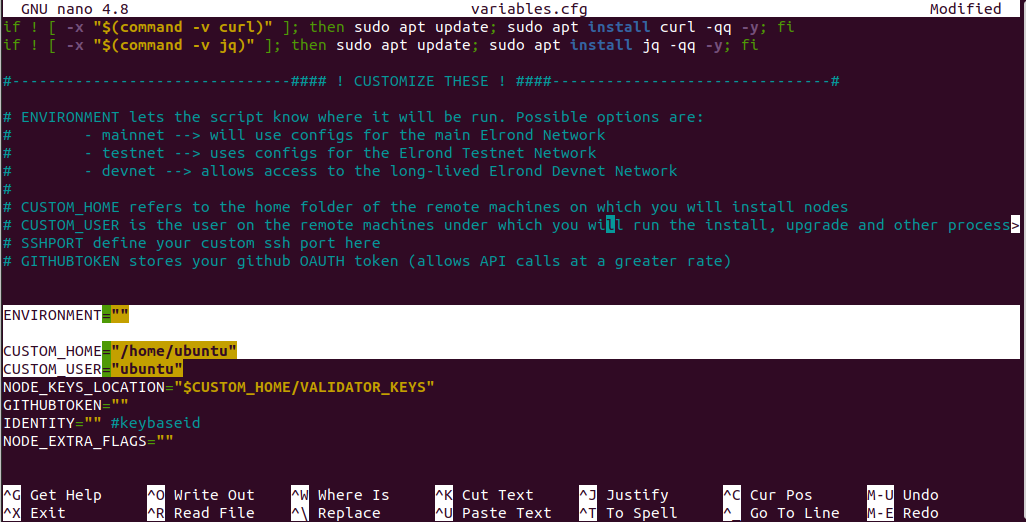
<img src="https://docs.multiversx.com/assets/images/variables-a2f570ae36b8e241263ec48a9213a00a.png" alt="REPLACE WITH OURS IMG BEFORE RELEASE" height="522" width="1026">

To save and exit in **vi** or **vim**: Press `Shift`+`Z` twice.

In **nano**: Press `Ctrl`+`X`, then `Y`, and

### **Grants** elevated **privileges**

To enable `sudo` commands for your user without requiring a password, follow these steps:

1. Open Terminal.
2. Type `sudo visudo -f /etc/sudoers.d/myOverrides` and press Enter. This will allow you to edit the sudoers file securely.
3. Once the file is open in the editor, navigate to the end by pressing `Shift + G`.
4. Press `o` to start a new line. Then, enter the following line, replacing `yourusername` with your actual username (you can find your username by running `whoami`):

   ```
   yourusername ALL=(ALL) NOPASSWD:ALL
   ```
5. To save and exit, press `Esc`, then `Shift + ZZ` (hold down `Shift` and press `Z` twice).

This configuration will enable your user to execute `sudo` commands without prompting for a password. Ensure you replace `yourusername` with the correct username. Proceed with caution, as this operation grants elevated privileges.


# Installation

To install the OneFinity Network validator node on your local machine, follow these steps. First, ensure you have configured user permissions, script settings, and keys. The Validator script, which you'll use to manage your node, supports Mainnet, Devnet, and Testnet.

### Install Your Node(s)&#x20;

Run the following commands:

```
cd ~/of-chain-scripts
./script.sh
```

Upon completing the previous step, a menu will appear offering several options. Choose option `1` to proceed with the installation of the node.

```
 1) install
 2) observing_squad
 3) upgrade
 4) upgrade_squad
 5) upgrade_proxy
 6) remove_db
 7) start
 8) stop
 9) cleanup
 10) github_pull
 11) add_nodes
 12) get_logs
 13) benchmark
 14) quit
 Please select an action:1
```

{% hint style="info" %}
NOTE

Alternatively, you can trigger the installation by running this command:

```bash
~/of-chain-scripts/script.sh install
```

{% endhint %}

* Indicate the number of nodes you want to run, i.e. `1`
* Indicate the name of your validator, i.e. `OneVal`
* Exit without starting (we need keys first) by using `14 - quit`

#### **Prepare your keys**[​](https://docs.multiversx.com/validators/nodes-scripts/install-update#prepare-your-keys): <a href="#prepare-your-keys" id="prepare-your-keys"></a>

Create a new folder "VALIDATOR\_KEYS" to serve as a local backup when updating:

```
cd ~
mkdir -p ~/VALIDATOR_KEYS
```

Generate a certificate file containing your Validator key by running the `keygenerator`:

```
./onefinity-utils/keygenerator
```

Copy the generated `validatorKey.pem` file to the `config` folder of your node(s), and repeat for each node.

```
cp validatorKey.pem ~/onefinify-nodes/node-0/config/
```

{% hint style="info" %}
NOTE

Each node needs its unique `validatorKey.pem` file
{% endhint %}

To ensure your node can restart smoothly after an upgrade, transfer the `validatorKey.pem` file, compressed in a ZIP format, to the `$HOME/VALIDATOR_KEYS/` directory. It's crucial that each node possesses a distinct `validatorKey.pem` file, repeat for each node:

```
zip node-0.zip validatorKey.pem
mv node-0.zip $HOME/VALIDATOR_KEYS/
```

For instructions on backing up and protecting your keys, see the Management section.

#### **Start the node(s)**[​](https://docs.multiversx.com/validators/nodes-scripts/install-update#start-the-nodes): <a href="#start-the-nodes" id="start-the-nodes"></a>

```
~/of-chain-scripts/script.sh start
```

#### **Start the node visual interface**[​](https://docs.multiversx.com/validators/nodes-scripts/install-update#start-the-node-visual-interface): <a href="#start-the-node-visual-interface" id="start-the-node-visual-interface"></a>

After your node is running, monitor its status through the `TermUI` interface. Go to `$HOME/onefinity-utils`, then launch `TermUI` for each node:

```
cd $HOME/onefinity-utils
./termui -address localhost:8080
```

{% hint style="info" %}
NOTE

When setting up your environment, you will start with your first node, named `node-0`, which operates as a REST API and listens on port `8080` by default. Following `node-0`, you will configure `node-1` to run on port `8081`, and you'll continue this pattern for any subsequent nodes, incrementing the port number by one each time.
{% endhint %}

### **Update your node(s)**[​](https://docs.multiversx.com/validators/nodes-scripts/install-update#update-your-nodes): <a href="#update-your-nodes" id="update-your-nodes"></a>

To upgrade your node, run the provided script and choose one of the available options.

* `10 - github_pull` downloads the latest version of the scripts
* `3 - upgrade`
* `7 - start`
* `14 - quit`

```
~/of-chain-scripts/script.sh
```

These are the basic steps. Please carefully read the on-screen instructions and refer to the script's README file. You can also ask questions in the OneFinity Validators chat.

### Secure Your Node: Protect Your Private Keys

To ensure you maintain control over your node, it is crucial to safeguard your private keys. Without them, your ability to manage your node effectively is compromised. Additionally, if a third party gains access to your private keys, you could face a significant financial loss. Therefore, it's important to exercise caution and prioritize the security of your keys.

#### Creating a Safe Backup

1. It's recommended to store a backup of your private keys in a secure location outside the server running your nodes.
2. Locate your keys within the folder path: `$HOME/onefinity-nodes/node-0/config`. If you operate multiple nodes (referred to as “`n`” nodes), ensure you follow this step for each one.
3. Implement strict access controls and encryption to enhance the security of the backup.

By taking these preventative measures, you can better protect your node and secure your investment.

### **Choosing a custom configuration tag or branch**[​](https://docs.multiversx.com/validators/nodes-scripts/install-update#choosing-a-custom-configuration-tag-or-branch) <a href="#choosing-a-custom-configuration-tag-or-branch" id="choosing-a-custom-configuration-tag-or-branch"></a>

{% hint style="danger" %}
WARNING

This option should only be used for debugging or testing ahead of a pre-release tag. Use it at your own risk!
{% endhint %}

The power of the scripts set has been leveraged with a new addition: the possibility to tell the scripts a specified tag or branch (not recommended using a branch due to the fact that an unsigned commit might bring malicious code or configs)

To accomplish this, edit the variables.cfg file

```
cd ~/of-chain-scripts/config
nano variables.cfg
MUST BE CONFiRMED WHEN WE HAVE THE NETWORK IN TESTNET
```

locate the `OVERRIDE_CONFIGVER` option and input a value there, something like `tags/T1.3.14.0`. The `tags/` prefix will tell the scripts to use the tag and not search a branch called `T1.3.14.0`. Call the `upgrade` command on the scripts to install the desired configuration version.

Resetting the value to `""` will make the scripts to use the released version.

{% hint style="danger" %}
WARNING

The `OVERRIDE_CONFIGVER` is not backed up when calling `github_pull` operation.
{% endhint %}


# Updates

## OneFinity Node upgrades

OneFinity will regularly perform node upgrades to incorporate new features, improvements, and bug fixes into its network. Unlike hard forks, these upgrades are backward compatible, ensuring no interruption in service. It's crucial for node operators to understand the upgrade process to maintain their nodes effectively and avoid any potential downtime.

#### When to Upgrade

Node operators should upgrade their nodes whenever a new binary is released for the OneFinity network, including the mainnet, testnet, or devnet. These upgrades are essential for keeping nodes up to date and secure.

#### How to Stay Informed

* **Validators Telegram Channel**: Join the OneFinity Validators Telegram channel for real-time updates and community support.
* **Email Notifications**: Subscribe to email notifications from the official GitHub repositories containing the chain configuration files.
* **OneFinity Explorer**: Set up monitoring on <https://explorer.onefinity.com/nodes> for alerts on new updates. Use this tool to check the status of your validator software version, looking for the ⚠ symbol to identify outdated versions.
* **Configuration Repositories**: Keep an eye on the of`-chain-mainnet-config`, of`-chain-testnet-config`, and `of-chain-devnet-config` repositories for the latest updates.

#### Summary

Staying informed and promptly upgrading your node is vital for the health of the OneFinity network and the efficiency of your node operation. By following the outlined steps and utilizing the available resources, node operators can ensure their nodes are always running the most current software version, contributing to a more stable and robust network.

#### Types of Upgrades

**A. All Nodes Need to Upgrade**: Essential for all nodes to maintain network compatibility; includes critical processing changes.

**B. Optional Upgrades**: Beneficial but not critical; includes features like new Rest API endpoints or improved syncing.

**C. Only Validators Need to Upgrade**: Pertains to changes affecting validators, such as rating adjustments or transaction selection enhancements. Optional for observers.

**Activation epochs**

To ensure smooth upgrades and consistent network views at all times, OneFinity employs an **activation epoch** mechanism. This approach allows nodes to support both the current and upcoming protocol versions until the change officially takes effect. Through this system, upgraded nodes stay compatible with those not yet upgraded, maintaining consensus in nearly all cases (99.9%). However, the complexity of codebase upgrades and third-party transactions can introduce unpredictable outcomes, making absolute certainty unattainable.

#### **Deterministic time / height for upgrades**[​](https://docs.multiversx.com/validators/node-upgrades#deterministic-time--height-for-upgrades) <a href="#deterministic-time--height-for-upgrades" id="deterministic-time--height-for-upgrades"></a>

While new features or bug fixes in the OneFinity Mainnet become effective based on epochs, precise timing is unpredictable due to potential delays, such as rollbacks. An epoch spans `43,200` rounds, equating to `24h`, with each round lasting `2sec`. Unlike some protocols where updates are tied to a specific block height, OneFinity's updates activate at the start of an epoch. However, the exact block height for the start of an epoch, and consequently the update, remains uncertain due to potential rollbacks.

{% hint style="info" %}
**NOTE**

2sec finalization time will be the first milestone but, as MultiversX, we expect to have a 1sec finalization time in 2025.
{% endhint %}

#### *Activation epoch example*[​](https://docs.multiversx.com/validators/node-upgrades#activation-epoch-example) <a href="#activation-epoch-example" id="activation-epoch-example"></a>

Introducing a new feature that allows smart contracts to receive `PayableBySC` metadata, enabling them to accept ONE tokens or other cryptocurrencies from other smart contracts. This feature becomes active in epoch `613`.

**Backwards Compatibility & Activation Timeline**

* **Before Epoch 613**: Transactions attempting to set `PayableBySC` are treated as `invalid metadata`.
* **Epoch 600 Release**: A new node binary is released, incorporating the `PayableBySC` feature, scheduled for activation in epoch `613`.
* **Post-Epoch 613**: Upon reaching epoch `613`, the feature activates. Transactions including `PayableBySC` metadata are processed as valid. All nodes must upgrade to stay in sync with the chain.

**Implications for Node Operators**

* Nodes not upgraded by the activation epoch (`613`) will diverge from the main chain, as they will process transactions differently.
* Upgrading to the new binary before epoch `613` ensures compatibility and supports new transactions involving `PayableBySC`.

**Current Status**

* The OneFinity Mainnet is currently at epoch `590`.
* The new feature is in preparation, with the community and node operators advised to ready themselves for the upcoming upgrade.

This streamlined approach ensures the network stays robust while introducing innovative features to enhance smart contract functionality.

|               | Epoch < 613        | Epoch >= 613 |
| ------------- | ------------------ | ------------ |
| IsPayableBySC | `invalid metadata` | `successful` |


# Management

## Manage a validator node

#### Overview

Becoming a validator node is a significant step up from being an observer, marking your enhanced commitment to helping maintain the network's integrity and security. This transition entails meeting specific essential conditions and is not taken lightly.

#### Initial Observer Mode

Upon setup, your node begins its journey in observer mode. This phase serves an educational purpose, giving you the opportunity to get acquainted with the network’s operations and its various nuances. It is a critical period for learning and exploration, allowing you to understand the network fully before taking on the validator role's responsibilities.

#### Join Our Telegram Community

One of the most effective ways to integrate into our network and move towards becoming a validator is to join our dedicated [Telegram community](https://t.me/+joYx8ooSbII1Nzc0). This platform isn't just about conversation—it's a rich resource filled with individuals passionate about our network's growth and success. Here, you can find guidance for your first challenges or advice for optimizing your setup, making it an invaluable tool for both newcomers and seasoned participants alike.

Our Telegram community further enriches this experience by fostering a sense of belonging, as everyone works towards enhancing network performance. For those feeling overwhelmed, our community admins are pivotal. They offer tailored support and connect individuals with a knowledgeable network, simplifying complex procedures such as node setup, understanding validation, and meeting validator criteria.

#### Requisites

* **Minimum Token Requirement**: Accumulating at least 3000 ONE tokens is the first step. These tokens are a fundamental requirement, acting as both a financial stake in the network's wellbeing and a deterrent against malicious activities. By staking your tokens, you are expressing a vested interest in the network's prosperity and stability.
* **Validator NFT**: The second prerequisite is obtaining a Validator NFT. This non-fungible token is symbolic of your eligibility and readiness to partake in the network's validation process. It's a credential, marking your node as capable and prepared to contribute to the network's consensus mechanism effectively.

{% hint style="success" %}
**NOTE**

A comprehensive management guide will be published here once the testnet becomes available.
{% endhint %}


# Nodes

Comprehensive node info repository.


# Rating

### **Introduction**

Rating influences a validator's likelihood of being selected for consensus in each round. A high-performing validator is preferred in the consensus process over a validator that sometimes fails to contribute or is not consistently online. Each validator possesses a **rating score**, which reflects its overall reliability, performance, and responsiveness. This value is crucial, and node operators should always be aware of their validators' ratings.

{% hint style="info" %}
INFO

Only validator nodes, not observer nodes, have a rating score.
{% endhint %}

When validators join the network immediately after staking, they start with an initial score of `50` points.

For details on the calculations:

#### Rating Metashard Validators and Shard Validators

Validators gain or lose rating points in a round depending on their role in that round (consensus proposer vs. consensus validator) and on their behavior within that role. Rating penalties are currently set to be `4` times as large as the corresponding gains. This means that a validator needs to perform an action correctly 4 times in order to compensate for performing it once incorrectly. Moreover, consecutive losses are *compounding*, which means that the rating penalty increases with each transgression. See

{% hint style="info" %}
INFO

Rating gains and losses on the MetaShard differ from those on the regular shards.
{% endhint %}

To locate a specific validator, utilize the "Search" box, then click on the desired validator in the resulting list. This action will take you to the "Node Details" page, which offers status information about the validator. You can find the historical and current ratings of individual validators in the OneFinity Network Explorer at the following URL: <https://explorer.onefinity.network/nodes>.

The "Node Details" page shows a graph of the validator's rating over previous epochs.

![The X-axis represent the epochs, and the Y-axis represents the rating.](https://gblobscdn.gitbook.com/assets%2F-LhHlNldCYgbyqXEGXUS%2F-MA1wJCHfE7ffob9gOjE%2F-MA1we9u12mvMRF1PU9y%2Fplot-rating.png?alt=media\&token=6a1f0071-66d0-4aec-8192-2a8f716e67bb)

### **The jail**[​](https://docs.multiversx.com/validators/rating#the-jail) <a href="#the-jail" id="the-jail"></a>

Validators are **jailed** for having a rating under `10`, meaning they're removed from the shard and excluded from consensus and rewards. However, if jailing a validator would drop a shard's size below a critical threshold, the validator won't be jailed to maintain network health.

#### Reinstating Jailed Validators

To bring a jailed validator back into the network, an **unjail** transaction must be sent to the Staking SmartContract. Upon unjailing, the validator enters a passive state for the duration of the current epoch and is then assigned back to the shard in the next epoch. It must synchronize with the shard before becoming active again.

{% hint style="info" %}
INFO

Validators are jailed at the end of an epoch if their rating drops below `10` and fails to recover by the epoch's end. Jailed validators have a chance to return to the network by meeting the unjailing criteria and undergoing the reinstatement process.
{% endhint %}

To improve the rating of a validator, ensure it is updated regularly, maintains strong connections, and operates on hardware that meets the system requirements.

### Multiple Validators on the same machine

Running **multiple validators on a single machine** can affect your rating and, as a result, *your rewards*. This happens if your machine does not meet the minimum requirements multiplied by the number of validators running on it.&#x20;

### **Consensus probabilities**[​](https://docs.multiversx.com/validators/rating#consensus-probabilities) <a href="#consensus-probabilities" id="consensus-probabilities"></a>

Without a rating system, each validator would have an equal chance of being chosen for consensus. However, introducing **rating modifiers** shifts these odds by adjusting the selection probability according to a validator's performance rating. This approach prioritizes high-performing validators, increasing their likelihood of being selected, while decreasing the chances for lower-performing ones. Essentially, rating modifiers refine the selection process, ensuring a more efficient and reliable network operation.

The following table shows how the rating of a validator influences its probability of being chosen for consensus:

| Rating interval | Modifier |
| :-------------: | :------: |
|     \[0-10]     |   -100%  |
|     (10-20]     |   -20%   |
|     (20-30]     |   -15%   |
|     (30-40]     |   -10%   |
|     (40-50]     |    -5%   |
|     (50-60]     |    0%    |
|     (60-70]     |    +5%   |
|     (70-80]     |   +10%   |
|     (80-90]     |   +15%   |
|     (90-100]    |   +20%   |

The consensus algorithm prioritizes validators based on their adjusted selection probabilities, considering these probabilities in relative terms to one another.

### **Calibration**[​](https://docs.multiversx.com/validators/rating#calibration) <a href="#calibration" id="calibration"></a>

For a **24-hour epoch**, the rating system is designed to:

* A new validator can achieve its maximum rating within approximately 72 hours, ensuring continuous productivity without any downtime.
* The rewards earned for acting as a block validator should be proportionate to the rewards for serving as a block proposer. This equilibrium needs to reflect the reality that the chance of being chosen as a proposer is significantly lower than the chance of being selected as a validator in the consensus process.

### **Rating validators**[​](https://docs.multiversx.com/validators/rating#rating-shard-validators) <a href="#rating-shard-validators" id="rating-shard-validators"></a>

#### **Rating the block proposer**[​](https://docs.multiversx.com/validators/rating#rating-the-shard-block-proposer) <a href="#rating-the-shard-block-proposer" id="rating-the-shard-block-proposer"></a>

The node chosen to propose the block for a specific round will:

* Earn `0.23148` points when your proposal succeeds by:
  1. Properly constructing the block
  2. Gaining acceptance from consensus validators
  3. Signing and broadcasting the block to the network
* Lose `0.92592` points for an unsuccessful proposal.

The loss incurred is four times greater than the gain. Consequently, a proposer needs to succeed four times in order to recoup the points lost from a single missed block.

For proposers, the rating system is more rigorous, implementing a compounding penalty rule. This rule accelerates the decline in a node's rating following unsuccessful proposals.

The amount of `0.92592` points is deducted from the rating of the proposer on the first unsuccesful proposal, but the second unsuccessful proposal will be penalized by `0.92592 × 1.1`. The third, by `0.92592 × 1.1 × 1.1`. The general formula is:

$$
0.92592 × 1.1^{cfp-1}0.92592×1.1^cfp^−1
$$

The penalty system exponentially increases imprisonment for proposers who consecutively fail to pass proposals. The variable `cfp` tracks the count of such failures.

#### **Rating the block validator**[​](https://docs.multiversx.com/validators/rating#rating-the-shard-block-validator) <a href="#rating-the-shard-block-validator" id="rating-the-shard-block-validator"></a>

The nodes participating in a consensus round, aside from the proposer, will:

* Earning Points through Validation

  Validators can earn `0.00367` points through successful validation, which involves two key actions:

  1. Block Proposal - The proposer develops and proposes a block.
  2. Block Signature - The validator acts as a signer on the proposed block. Being a signer signifies that the validator has approved the block and was among the first to be included in the 2/3 majority of signatures received by the proposer.
* Lose `0.01469` points for an unsuccessful proposal.

To receive gains, a validator must have been a "signer" in at least 1% of recent blocks. Lack of past performance means no gains until improvement is noted. Also, should the proposer fail to propose a block in a given round, all validators will see a reduction in their rating.

### **Rating metashard validators**[​](https://docs.multiversx.com/validators/rating#rating-metashard-validators) <a href="#rating-metashard-validators" id="rating-metashard-validators"></a>

The rating mechanism for the metashard is identical with the rating mechanism of the normal shards, but the gain / loss values themselves are configured differently.

#### **Rating the metashard block proposer**[​](https://docs.multiversx.com/validators/rating#rating-the-metashard-block-proposer) <a href="#rating-the-metashard-block-proposer" id="rating-the-metashard-block-proposer"></a>

The metachain proposer will:

* Gain `0.23148` points for a successful proposal;
* Lose `0.92592` points for an unsuccessful proposal.

{% hint style="warning" %}
The compounding penalty rule also applies to block proposers of the metachain.
{% endhint %}

#### **Rating the metashard block validator**[​](https://docs.multiversx.com/validators/rating#rating-the-metashard-block-validator) <a href="#rating-the-metashard-block-validator" id="rating-the-metashard-block-validator"></a>

A validator taking part in consensus on the metachain will:

* Gain `0.00057` points for a successful validation;
* Lose `0.00231` points for an unsuccesful validation.

{% hint style="warning" %}
The rules from Rating the shard block validator apply for the metashard validators as well.
{% endhint %}


# Redundancy Setup

#### Redundancy in OneFinity Validator Nodes

OneFinity allows setting up hot-standby nodes for each Main Validator, enhancing high availability by using the same `validatorKey.pem` across 'n' additional nodes. These nodes, hosted on separate servers, synchronize with the Main Validator and take over automatically if it fails. Configuration differentiation is achieved with a specific setting in the `prefs.toml` file.

#### Configuring Hot Standby Nodes with RedundancyLevel

The `RedundancyLevel` setting in the `prefs.toml` configuration file enables the management of hot-standby nodes in a network. It determines the behavior and role of each node in relation to the Main Validator. Here's a breakdown of how to effectively use this option:

* **Main Validator (`RedundancyLevel=0`)**: A node with this setting is designated as the Main Validator. It is responsible for proposing and signing blocks. If the `RedundancyLevel` is unset, the node defaults to `0`, making it the Main Validator. This ensures seamless backward compatibility and does not affect existing validators during upgrades.
* **Hot-Standby Nodes (`RedundancyLevel=positive value`)**: Nodes configured with a positive `RedundancyLevel` act as backups. They synchronize with the network and shuffle between shards, mirroring the Main Validator, but do not sign blocks. The value set indicates the node's priority in the automatic fail-over sequence. For example:
  * A node with `RedundancyLevel=1` becomes active after 5 (level\*5) missed rounds by the Main Validator.
  * A node with `RedundancyLevel=3` activates after 15 (level\*5) missed rounds, or 10 rounds following the first hot-standby, whichever comes first.
* **Inactive Standby Nodes (`RedundancyLevel=large or negative value`)**: Setting a large value (e.g., 1 million) or a negative value (e.g., -1) ensures that the node remains passive. It will not produce/sign blocks but will stay synchronized with the network.

This setup provides a robust and adaptable network framework, guaranteeing stable block creation and verification, even with disruptions.

{% hint style="warning" %}

#### &#x20;GUIDELINES FOR REDUNDANCY LEVEL CONFIGURATION

* **Unique Redundancy Levels**: Ensure each node has a unique `RedundancyLevel`. Nodes with identical `RedundancyLevel` values may sign blocks simultaneously, which doesn't impact the protocol now, but future updates will penalize double signing through slashing of the BLS key's stake.
* **Main Validator Recovery**: If the Main Validator (`RedundancyLevel 0`) becomes online again, hot-standby nodes will automatically switch back to standby mode.
* **Public Key Privacy**: Hot-standby nodes use a different, automatically generated public key for network advertisement. This hides the actual public key that will be used for signing header blocks, enhancing security.
  {% endhint %}

#### Improved Mitigation Against DDoS Attacks Using BLS Public Keys

The implementation of BLS public keys enhances security by making it more challenging for attackers to target all IP addresses associated with a given validator. This is achieved through a mechanism where, in the event of the Main Validator being compromised, the hot-standby nodes only reveal their association with the BLS public key when necessary for block signing, maintaining their anonymity at other times. This strategic reveal ensures that:

* **Hot-standby nodes remain under the radar**, not drawing unnecessary attention that could lead to a DDoS attack. They only become visible to the network when they step in to sign blocks, minimizing their exposed footprint.
* **Signature continuity is maintained.** The activation of hot-standby nodes to sign blocks does not necessitate re-verification of BLS signatures by the network, ensuring a seamless transition and uninterrupted consensus process.
* **Strategic functionality of hot-standby nodes.** The deployment of random BLS keys on these nodes serves several critical functions, notably enhancing their ability to remain undetected when not actively participating in the consensus process, thereby significantly reducing the risk of attack.

This approach adds a layer of protection against DDoS attacks, safeguarding the network by concealing the full scope of IP addresses associated with it and ensuring the resilience and integrity of the consensus process.


# Configuration files

### Configuration Constraints

While operators have the flexibility to customize certain settings, such as adjusting the size of a cache or specifying an Elasticsearch instance, not all configuration values are open for modification. Critical parameters, like the genesis total supply, must remain unchanged to ensure consistency across the network.

#### Locating Configuration Files

By default, configuration files are situated in the `config` directory, typically found near the node's executable. To alter these paths, operators can utilize CLI flags available with the node's binary.

Below, you can find an example of what the configuration files look like for the `v0.1.0` node.

```
├── api.toml
├── config.toml
├── economics.toml
├── enableEpochs.toml
├── enableRounds.toml
├── external.toml
├── gasSchedules
│ ├── gasScheduleV1.toml
│ ├── gasScheduleV2.toml
│ ├── gasScheduleV3.toml
│ ├── gasScheduleV4.toml
│ ├── gasScheduleV5.toml
│ ├── gasScheduleV6.toml
│ └── gasScheduleV7.toml
├── genesisContracts
│ ├── delegation.wasm
│ └── dns.wasm
├── genesis.json
├── genesisSmartContracts.json
├── nodesSetup.json
├── p2p.toml
├── prefs.toml
├── ratings.toml
├── systemSmartContractsConfig.toml
├── testKeys
│ ├── delegationWalletKey.pem
│ ├── dnsWalletKey.pem
│ ├── esdtWalletKey.pem
│ └── protocolSustainabilityWalletKey.pem
└── upgradeContracts
    └── dns
        └── v3.0
            ├── deploy.json
            └── dns.wasm

```

### Blockchain Configuration Files Overview

This document provides an overview of various configuration files used in a blockchain setup. Each file serves a specific purpose, ranging from system smart contracts settings to peer-to-peer network configurations.

#### `systemSmartContractsConfig.toml`

Contains configurable values for System Smart Contracts, including parameters for Staking, ESDT, and Governance.

#### `ratings.toml`

Holds the parameters used for the nodes' rating mechanism, such as the starting rating and decrease steps.

#### `prefs.toml`

Stores a set of custom configuration values that should not be replaced from one upgrade to another.

#### `p2p.toml`

Includes peer-to-peer configurable values, such as the number of peers to connect to.

#### `nodesSetup.json`

Maintains all the Genesis nodes' public keys, alongside their wallet addresses.

#### `genesisSmartContracts.json`

Specifies the Smart Contracts to be deployed at Genesis time, alongside additional parameters.

#### `genesis.json`

Contains all the addresses and their balance/active delegation at the genesis.

#### `genesisContracts`

Is the directory that contains the WASM contracts deployed at the genesis.

#### `gasSchedules`

The directory holding the gas consumption configuration to be used for Smart Contract execution, depending on activation epochs specified in `enableEpochs.toml` under `GasSchedule -> GasScheduleByEpochs`.

#### `external.toml`

Contains external drivers' configurations, such as Elasticsearch or event notifier.

#### `enableRounds.toml`

Lists new features or bug fixes and their activation epoch. (Note: Duplicate with `enableEpochs.toml`; verify the actual usage in the system.)

#### `enableEpochs.toml`

Lists new features or bug fixes and their activation epoch.

#### `economics.toml`

Contains the economics configuration, such as genesis total supply, inflation per year, developer fees, etc.

#### `config.toml`

Contains the main configuration of the node, including storers & cachers type and size, type of hasher, type of marshaller, etc.

#### `api.toml`

Contains the Rest API endpoints configuration, detailing open or closed endpoints, logging, and so on.

### Overriding config.toml values[​](https://docs.multiversx.com/validators/node-configuration#overriding-configtoml-values) <a href="#overriding-configtoml-values" id="overriding-configtoml-values"></a>

As mentioned in the above descriptions, `prefs.toml` is not overwritten by the installation scripts when performing an upgrade.

However, there are some more custom values that nodes operators use (antiflood disabled or with fewer constraints, db lookup extension, and so on) and they don't want these values to be changed during an upgrade.

For this use-case, release `v1.4.x` introduces the `OverridableConfigTomlValues` setting inside `prefs.toml` that is able to override certain configuration values from `config.toml`.

Here's how to use it:

```
   OverridableConfigTomlValues = [
     { Path = "StoragePruning.NumEpochsToKeep", Value = "4" },
     { Path = "MiniBlocksStorage.Cache.Name", Value = "MiniBlocksStorage" }
   ]
```

Therefore, after each upgrade, the node will override these values to the newly provided values. The path points to an entry in `config.toml` file before setting a new overridable value.


# Operation modes

#### Introduction

Starting with the `v1.x.y` release, a new CLI flag has been introduced to the node: `--operation-mode`. Its purpose is to override certain configuration values, enabling the node to operate differently based on the use case. Without any configuration changes, nodes will start with the default settings. However, there are several ways to configure the node to suit the desired operation mode. Instead of manually editing the `toml` files (or doing so programmatically via `sed`, for example), you can use the `--operation-mode` CLI flag to specify a custom operation mode. This results in configuration changes tailored to your needs.

### Available Operation Modes

#### Full archive[​](https://docs.multiversx.com/validators/node-operation-modes#full-archive) <a href="#full-archive" id="full-archive"></a>

Enabling `full-archive` mode reconfigures the node to sync from the beginning and handle historical queries. However, be prepared for a longer sync time due to limited full archive peers available.

```bash
./node --operation-mode full-archive
```

#### Db Lookup Extension[​](https://docs.multiversx.com/validators/node-operation-modes#db-lookup-extension) <a href="#db-lookup-extension" id="db-lookup-extension"></a>

The `hyperblock` endpoint and others like `/network/esdt/supply/:tokenID` or `/transaction/:txhash?withResults=true` depend on the `db-lookup-extension` mode. This mode adjusts the node's setup to enhance databases, enabling them to store additional data such as logs and block-epoch links, which supports more complex Rest API queries.

```
./node --operation-mode db-lookup-extension
```

#### Historical balances[​](https://docs.multiversx.com/validators/node-operation-modes#historical-balances) <a href="#historical-balances" id="historical-balances"></a>

Enabling the `historical-balances` mode alters the node configuration to support historical balance queries by preventing trie pruning. This increases disk usage but enables querying past block balances or nonces of addresses.

```
./node --operation-mode historical-balances
```

#### Snapshotless-Observer Mode

This mode streamlines the node for real-time requests like live balance updates or transaction broadcasts. It deactivates trie snapshotting and ensures obsolete data is purged, enhancing efficiency by avoiding resource-intensive operations.

```
./node --operation-mode snapshotless-observer
```


# Node Databases

This page will describe the databases used by the Node. These are simple key-value storage units that will hold different types of data, as described below.

### **Databases**[​](https://docs.multiversx.com/validators/node-databases#node-databases) <a href="#node-databases" id="node-databases"></a>

Nodes use simple Key-Value type databases.

Nodes use Serial LevelDB databases to persist processed blocks, transactions, and so on.

Data retention can be controlled in `config.toml` using pruning flags. There are two flags for the latest versions:

* `ValidatorCleanOldEpochsData`
* `ObserverCleanOldEpochsData`

For older configurations, the single flag is:

* `CleanOldEpochsData`

Setting these flags to false prevents the deletion of old databases.

By default, validators only keep the last 4 epochs and delete older ones for freeing disk space.

The default databases directory is `<node-working-directory>/db` and it's content should match the following structure:

```
/db
└── <chain id>
    ├── Epoch_X
    │  └── Shard_X -------->
    │        ├── BlockHeaders
    │        │    ├── 000001.log
    │        │    ├── CURRENT
    │        │    ├── LOCK
    │        │    ├── LOG
    │        │    └── MANIFEST-000000
    │        ├── BootstrapData
    │        │    ├── 000001.log
    |     .............
    └── Static
        └── Shard_X -------->
            ├── AccountsTrie
            │     └── MainDB
            │           ├── 000001.log
         .............
```

During startup, nodes check for an existing database and sync any missing data from the network to match the current network height.

### Starting a Node with Existing Databases

When both the configuration and the database shard match, the node inherits the full database state and needs to sync only the remaining items. For example, if a node starts with a database at epoch 255 and the current epoch is 256, it will sync only the missing epoch data.

The configuration of the new node should mirror that of the predecessor, with the exception of the BLS key, which does not depend on the database.

To expedite synchronization, it's possible to copy the fully synced database from another node. This process involves transferring the entire `db/` directory from the source to the target node.


# Import Database

This page will guide you through the process of starting a node in import-db mode, allowing the reprocessing of older transactions.

### Nodes can revalidate an existing database by importing it and initializing with designated flags.

#### Blockchain State Verification and Data Indexing

Checking the blockchain state at a specific point in time, ensuring software compatibility, validating blockchain integrity, and indexing data from genesis to the present are critical tasks for maintaining a secure and efficient blockchain system. This guide covers how to:

* **Check Blockchain State at a Specific Time**: This involves using APIs or direct database access to examine the state of the blockchain at a given block number (e.g., block 255255). For example, one could import the database module and configure the node to pause at the block of interest.
* **Ensure Backwards Compatibility with New Software Versions**: It's crucial to verify that updates or new versions of the blockchain software do not introduce compatibility issues with existing data and functionalities.
* **Validate Blockchain State**: Regularly validating the integrity and consistency of the blockchain state helps in identifying and rectifying discrepancies early.
* **Index Data in Elasticsearch**: For enhanced query capabilities and analytics, you can index all the blockchain data, from the genesis block to the latest, into a search engine like Elasticsearch.

### How to start the process[​](https://docs.multiversx.com/validators/import-db#how-to-start-the-process) <a href="#how-to-start-the-process" id="how-to-start-the-process"></a>

Let's suppose we have the following data structure:

```
  ~/of-chain-go/cmd/node
```

The `node` binary is in the specified path. We also have a database built from a continuously syncing observer with the chain from genesis without shard switching.. This database will be placed in a directory, let's presume we will place it near the node's binary, yielding a data structure as follows:

```
.
├── config
│    ├── api.toml
│    ├── config.toml
│    ...
├── import-db
│    └── db
│        └── 1
│            ├── Epoch_0
│            │     └── Shard_1
│            │         ├── BlockHeaders
│            │         │   ...
│            │         ├── BootstrapData
│            │         │   ...
│            │         ...
│            └── Static
│                  └── Shard_1
│                      ...
├── node
```

Ensure the `db` directory is a subdirectory of `import-db`. Verify that the `config` directory, especially the `prefs.toml` file, matches the original node's configuration.

{% hint style="danger" %}
WARNING

Before you begin the import-db process, ensure that the `/of-chain-go/cmd/node/db` directory is completely empty. This will allow the import to start from the genesis block and proceed up to the last available epoch.
{% endhint %}

Next, the node can be started by using:

```
 cd ~/of-chain-go/cmd/node
 ./node -use-log-view -log-level *:INFO -import-db ./import-db
```

{% hint style="info" %}
NOTE

The `-import-db` flag designates the path to the source database directory. In the given example, it's assumed the directory is named `import-db` and is situated close to the `node` executable.
{% endhint %}

The node will start the reprocessing of the provided database. It will end with a message like:

```
import ended because data from epochs [x] or [y] does not exist
```

{% hint style="info" %}
NOTE

To accelerate the import-db process, omit checking block header signatures when using data from a trusted source. Add the `-import-db-no-sig-check` flag upon starting the node, alongside previously mentioned flags.
{% endhint %}

### Import-DB with populating an Elasticsearch cluster[​](https://docs.multiversx.com/validators/import-db#import-db-with-populating-an-elasticsearch-cluster) <a href="#import-db-with-populating-an-elasticsearch-cluster" id="import-db-with-populating-an-elasticsearch-cluster"></a>

Utilizing the `import-db` mechanism allows for the efficient population of an Elasticsearch cluster by re-processing data through this process.

{% hint style="info" %}
NOTE

Import-DB for populating an Elasticsearch cluster should be used only for a full setup (a node in each Shard + a Metachain node)
{% endhint %}

* To prepare, update the `external.toml` file on each node.&#x20;
* Use Import-DB only for full setups. &#x20;
* Nodes will push re-processed data to the Elasticsearch cluster if configured correctly.

{% hint style="warning" %}
**More details will be released when the testnet phase starts.**
{% endhint %}


# Node CLI

This page will guide you through the CLI fields available for the node and other tools from the mx-chain-go repository.

### **Introduction**[​](https://docs.multiversx.com/validators/node-cli#introduction) <a href="#introduction" id="introduction"></a>

The **Command Line Interface** of the **Node** and its associated **Tools** is described at the following locations:

* Node
* SeedNode
* Keygenerator
* TermUI
* Logviewer

{% hint style="warning" %}
Links will be released when testnet phase starts
{% endhint %}

### **Examples**[​](https://docs.multiversx.com/validators/node-cli#examples) <a href="#examples" id="examples"></a>

To launch an Observer Node, use the command:

```
./node --rest-api-interface=localhost:8080 \
 --log-save --log-level=*:DEBUG --log-logger-name \
 --destination-shard-as-observer=0 --start-in-epoch\
 --validator-key-pem-file=observer0.pem
```

To start a Node as a Metachain Observer, use the command:

```
./node --rest-api-interface=localhost:8080 \
 --use-log-view --log-save --log-level=*:DEBUG --log-logger-name \
 --destination-shard-as-observer=metachain --start-in-epoch\
 --validator-key-pem-file=observerMetachain.pem
```


# Staking

Staking rewards, possibility of slashing, or increasing/decreasing a node rating, are a set of incentives that encourage token holders and validators to secure the OneFinity Network. In return for security, the validators can increase their relative share of token holdings in the network.

&#x20;We believe that staking rewards do not exist to provide an income stream per se to the token holders. In fact, the economic rationale for staking is not to receive a reward (“yield”), but instead to clearly assert to the validators that staking increases their relative interest (through the amount of ONE owned) in the network, and also contributes to significant token appreciation.

&#x20;With this in mind, it is better to look at the inflation rate as a token holder dilution rate instead. As such, staking is the best way to grow your token holdings and interest in the OneFinity network.

&#x20;Here are how rewards will be paid in **OneFinity**:

&#x20;There will be a minimum guaranteed reward amount per year. The minimum guaranteed reward amount will come from fees and token inflation. The maximum inflation rate per year is based on if the fees are 0.

&#x20;The guaranteed rewards per year are calculated based on the following formulas:

| Year   | Calculation         | \*Rewards based on a total supply of 25.5 million |
| ------ | ------------------- | ------------------------------------------------- |
| Year 1 | Total Supply x 5.0% | 1,275,000                                         |
| Year 2 | Total Supply x 4.5% | 1,204,875                                         |
| Year 3 | Total Supply x 4.0% | 1,119,195                                         |
| Year 4 | Total Supply x 3.5% | 1,018,467                                         |
| Year 5 | Total Supply x 3.0% | 903,526                                           |
| Year 6 | Total Supply x 2.5% | 775,527                                           |
| Year 7 | Total Supply x 2.0% | 635,932                                           |
| Year 8 | Total Supply x 1.5% | 486,488                                           |
| Total  |                     | 7,419,010                                         |

*\*These rewards are used as an example. As the token is deflationary the actual rewards will adjust based on the current total supply.*

&#x20;The guaranteed rewards will be distributed between all the active validators. Therefore, less validators means more rewards per validator.

&#x20;There will be a maximum total of 7,419,010 tokens minted to provide the rewards for staking based on the total supply being 25,500,000.


# Unstaking

### Unstaking process

If a validator wishes to unstake, they will initiate a transaction that indicates that they want to unstake a number of nodes, including the BLS public key of each node. The transaction is generated by the validator and sent to the Sovereign Chain.

&#x20;At the end of the epoch, when nodes are re-shuffled, those who unstaked during the just-completed epoch will be shuffled out first.

&#x20;\- If the node cannot be shuffled out, then the node must “stay and work.” If the node decides to go offline, then their rating decreases and at some point they will be under *ratingThreshold* making it ineligible to participate in the next selection or auction process. A node below *ratingThreshold* cannot be un-staked until the rating is above *ratingThreshold* (see *resetRating* transaction).

\- If there are more unstaking nodes on a shard than the number of nodes in the waiting list the Sovereign Chain computes an order for shuffling out and just the first waiting nodes from the list are removed.

&#x20;If a validator initiates unstaking, and then in the same epoch, decides not to proceed, he can send a re-stake transaction and his unstaking will be canceled.

&#x20;The unstaking information is saved in the validator staking smart contract. The re-stake transaction is the same as submitting an initial stake, the only difference is that the validator does not need to send the value again.

### &#x20;**Unbonding process**

The unbond period is set at 10 days, after which the node will be able to retrieve its previously staked funds.

&#x20;During the unbonding period:

&#x20;\- It is theoretically possible for a node’s unbonding period to never end if all the nodes of the system have left, and there are not enough nodes to run the shard. However, this cannot practically happen, as OneFinity will provide nodes for at least the shard, at the minimum reserve node price. In this way, we ensure a fail-safe mechanism where OneFinity is the node operator of last resort.

&#x20;At the end of the unbond period, the validator sends a transaction requesting the unstaked money for each of the nodes that he is choosing to unstake.

&#x20;The unbond request is processed by the Sovereign Chain nodes only if the unbond period has concluded for each respective node. If the unbond period has not concluded, then all gas is consumed.


# Jail/Unjail

### **Introduction**[​](https://docs.multiversx.com/validators/staking/unjailing#introduction) <a href="#introduction" id="introduction"></a>

In the unfortunate event of losing too much **rating score**, a validator will be **jailed**. This means they will be removed from the Sovereign Shard, will not participate in consensus, and consequently, will not earn any rewards. Currently, a node will be jailed if its rating falls to `10` or below. Learn more on the Rating page.

### How to Unjail a Validator

Unjailing a validator is a straightforward process that involves submitting a transaction to the Staking Smart Contract. This transaction, known as an **unjailing transaction**, is essentially a fine payment that facilitates the return of your jailed validator to the network. Upon successful execution, the validator is reinstated in the following epoch, starting anew with a rating of `50`.

#### Requirements for Unjailing Transactions

* **Proper Encoding:** The transaction must include all necessary information, correctly encoded.
* **Sufficient Gas Limit:** Ensure the gas limit is high enough to carry out the transaction without issues.
* **BLS Public Keys:** Examples may showcase BLS public keys. **Important:** These keys are randomly generated for demonstrative purposes only and do not correspond to actual nodes. Avoid using them in your real staking transactions.

#### Steps to Unjail Your Validator

1. **Through the Online Wallet:** Navigate to OneFinity Wallet where you can easily submit your unjailing transaction.
2. **Using Command-Line Tools:** Alternatively, tools like `ofpy` allow for command-line submission of unjailing transactions.

Remember, choosing to unjail your validator is an opportunity to reintegrate into the network and contribute once again as a fresh participant.

The following pages will describe both approaches in each specific case.

## **Prerequisites**[​](https://docs.multiversx.com/validators/staking/unjailing#prerequisites) <a href="#prerequisites" id="prerequisites"></a>

In order to submit an unjailing transaction, you require the following:

* A wallet with at least 300 ONE (the cost of unjailing a *single validator*). If you want to unjail multiple validators at once, you need to multiply that minimum amount with the number of validators. For example, unjailing 3 validators at once will require 900 ONE. Make sure you have enough in your wallet.
* The **BLS public keys** of the validators you want to unjail. You absolutely **do not require the secret key** of the validators. The BLS public keys of the validators are found in the `validatorKey.pem` files. Please read [Validator Keys](https://docs.multiversx.com/validators/key-management/validator-keys) to find out how to extract the public key only. Remember that the BLS public key consists of exactly 192 hexadecimal characters (that is, `0` to `9` and `a` to `f` only).

## Unjailing Nodes Through the Wallet

To unjail nodes, carefully follow the steps outlined below, ensuring that you replace the placeholders with your actual data.

1. **Open the Wallet**: Navigate to [Onefinity Wallet](https://wallet.onefinity.com).
2. **Fee Limit Section**: Expand this section in the form to reveal the "Gas limit" field. The value for "Gas limit" is calculated based on how many nodes you intend to unjail. Use the following formula: `6000000 * [Number of Nodes]`. Examples:

   * For 1 node: `6000000`
   * For 2 nodes: `12000000`
   * For 3 nodes: `18000000`

   This action also enables the "Fee limit" field to auto-calculate the transaction cost.
3. **Amount Field**: Determine the amount of ONE needed by multiplying `[Number of Nodes]` by `300 ONE`. Examples:
   * For 1 node: `300 ONE`
   * For 2 nodes: `600 ONE`
   * For 3 nodes: `900 ONE`
4. **To Field**: Insert the Staking SmartContract address responsible for unjailing.
5. **Send**: Hit the "Send" button once all fields are correctly filled.

Ensure you understand each information piece and adjust accordingly with your specific details.

## **Data field**[​](https://docs.multiversx.com/validators/staking/unjailing#the-data-field) <a href="#the-data-field" id="the-data-field"></a>

When entering information into the "Data" field, it's imperative that you follow the specific format outlined below. The information you input must be precisely structured, as the Staking Smart Contract utilizes this data to identify which nodes you intend to unjail. You have the flexibility to unjail multiple nodes simultaneously.

#### **Unjailing a single node**[​](https://docs.multiversx.com/validators/staking/unjailing#unjailing-a-single-node) <a href="#unjailing-a-single-node" id="unjailing-a-single-node"></a>

If you want to unjail a single node, the format of the "Data" field is simple:

```
unJail@<BLS1>
```

To correctly populate the "Data" field, do not directly copy and paste the template provided. Instead, you must substitute `<BLS1>` with the actual **BLS public key** from the node you wish to stake with. Locate this key within the `validatorKey.pem` file associated with the desired node. This step ensures accurate and secure staking configurations.

For an unjailing transaction of a single node, the "Data" field appears thus: Do not remove the `@` symbol, which separates information within "Data". Replace `<BLS1>`, removing the angle:

`unJail@b617d8bc442bda59510f77e04a1680e8b2d3293c8c4083d94260db96a4d732deaaf9855fa0cef2273f5a67b4f442c725efc06a5d366b9f15a66da9eb8208a09c9ab4066b6b3d38c3cf1ea7fab6489a90713b3b56d87de68c6558c80d7533bf27`

![img](https://gblobscdn.gitbook.com/assets%2F-LhHlNldCYgbyqXEGXUS%2F-MA1YB7F53LJCTlFj8qn%2F-MA1_N1up06vncGVTyfp%2Funjailing-single-node.png?alt=media\&token=fe0ca638-6433-4c07-b7ac-ef3fcf199835)

## **Unjailing multiple nodes at once**[​](https://docs.multiversx.com/validators/staking/unjailing#unjailing-multiple-nodes-at-once) <a href="#unjailing-multiple-nodes-at-once" id="unjailing-multiple-nodes-at-once"></a>

Unjailing multiple nodes simultaneously follows a similar process to unjailing a single node. Simply concatenate the BLS public keys of each additional node you want to unjail, using `@` as a separator, in the "Data" field. Ensure you're familiar with the process for unjailing a single node by reviewing "Unjailing a single node" section beforehand. Remember to adjust the "Amount" and "Gas Limit" fields based on the total number of nodes you're unjailing.

For a *single* node:

```
unJail@<BLS1>
```

For *two* nodes:

```
unJail@<BLS1>@<BLS2>
```

And for *three* nodes:

```
unJail@<BLS1>@<BLS2>@<BLS3>
```

To augment the existing format with additional nodes, incorporate the specific **BLS public keys** of your nodes by substituting `@<BLS…>` with the relevant keys. You can locate these public keys in the `validatorKey.pem` files for each node. It's crucial to ensure that you're only using the **BLS public keys** and not exposing any BLS secret keys. For guidance on reading and understanding the contents of `validatorKey.pem` files, please refer to the Validator Keys documentation.

For example, the "Data" field for an unjailing transaction for two nodes looks like this:

`unJail@b617d8bc442bda59510f77e04a1680e8b2d3293c8c4083d94260db96a4d732deaaf9855fa0cef2273f5a67b4f442c725efc06a5d366b9f15a66da9eb8208a09c9ab4066b6b3d38c3cf1ea7fab6489a90713b3b56d87de68c6558c80d7533bf27@f921a0f76ed70e8a806c6f9119f87b12700f96f732e6070b675e0aec10cb0723803202a4c40194847c38195db07b1001f6d50c81a82b949e438cd6dd945c2eb99b32c79465aefb9144c8668af67e2d01f71b81842d9b94e4543a12616cb5897d`

![img](https://gblobscdn.gitbook.com/assets%2F-LhHlNldCYgbyqXEGXUS%2F-MA1mbsWLwDtxs1LX3w-%2F-MA1nGcSQTZqmnGoxtRA%2Funjailing-two-nodes.png?alt=media\&token=991f11c8-fe7c-46f5-93fb-566ab0590279)

#### &#x20;<a href="#the-general-format" id="the-general-format"></a>

## **Unjailing through ofpy**[​](https://docs.multiversx.com/validators/staking/unjailing#unjailing-through-mxpy) <a href="#unjailing-through-mxpy" id="unjailing-through-mxpy"></a>

Ensure you have the latest version of `ofpy` installed before proceeding. If you haven't installed `ofpy`, please follow these instructions (LINK TO INSTRUCTIONS). By utilizing `ofpy` for submitting the unjailing transaction, you eliminate the need to manually craft the "Data" section. `ofpy` allows for the automatic construction and direct submission of the transaction to the network in a single, streamlined command.

### **Your Wallet PEM file**[​](https://docs.multiversx.com/validators/staking/unjailing#your-wallet-pem-file) <a href="#your-wallet-pem-file" id="your-wallet-pem-file"></a>

To send transactions on your behalf *without* using the online OneFinity Wallet, `ofpy` must be able to sign for you. For this reason, you have to generate a PEM file using your Wallet mnemonic.

Please follow the guide [Deriving the Wallet PEM file](https://docs.multiversx.com/sdk-and-tools/sdk-py/deriving-the-wallet-pem-file) CHECK LINK!. Make sure you know exactly where the PEM file was generated, because you'll need to reference its path in the `ofpy` commands.

After the PEM file was generated, you can issue transactions from `ofpypy`directly.

## **The unjailing transaction**[​](https://docs.multiversx.com/validators/staking/unjailing#the-unjailing-transaction) <a href="#the-unjailing-transaction" id="the-unjailing-transaction"></a>

The following commands assume that the PEM file for your Wallet was saved with the name `walletKey.pem` in the current folder, where you are issuing the commands from.

The command to submit an unjailing transaction with `ofpy` is this:

```
ofpy --verbose validator unjail --pem=walletKey.pem --value="<unjail-value>" --nodes-public-keys="<BLS1>,<BLS2>,...,<BLS99>" --proxy=https://gateway.multiversx.com --estimate-gas --recall-nonce
```

Notice that we are using the `walletKey.pem` file. Moreover, before executing this command, you need to replace the following:

* Replace `<unjail-value>` with the amount of EGLD required for unjailing your validators. You need to calculate this value with respect to the number of nodes you are unjailing. See the [beginning of the Unjailing through the Wallet](https://docs.multiversx.com/validators/staking/unjailing#unjailing-through-the-wallet) section for info on how to do it.
* Replace all the `<BLS…>` with the actual **BLS public keys** of your nodes, which you can find inside their individual `validatorKey.pem` files. Make sure you **do not write the BLS secret keys**! Read the page [Validator Keys](https://docs.multiversx.com/validators/key-management/validator-keys) to see how to interpret the `validatorKey.pem` files.

Additionally, it's important to note that "Gas Limit" calculations are not provided by default. However, by using the `--estimate-gas` option with `mxpy`, the gas limit can be automatically estimated for you.

Here's an example for an unjailing command for one validator:

```
ofpy --verbose validator unjail --pem=walletKey.pem --value="2500000000000000000000" --nodes-public-keys="b617d8bc442bda59510f77e04a1680e8b2d3293c8c4083d94260db96a4d732deaaf9855fa0cef2273f5a67b4f442c725efc06a5d366b9f15a66da9eb8208a09c9ab4066b6b3d38c3cf1ea7fab6489a90713b3b56d87de68c6558c80d7533bf27" --proxy=https://gateway.multiversx.com --estimate-gas --recall-nonce
```

{% hint style="warning" %}
IMPORTANT

You must take **denomination** into account when specifying the `value` parameter in **ofpy**.
{% endhint %}

For two validators, the command becomes this one:

```
ofpy --verbose validator unjail --pem=walletKey.pem --value="5000000000000000000000" --nodes-public-keys="b617d8bc442bda59510f77e04a1680e8b2d3293c8c4083d94260db96a4d732deaaf9855fa0cef2273f5a67b4f442c725efc06a5d366b9f15a66da9eb8208a09c9ab4066b6b3d38c3cf1ea7fab6489a90713b3b56d87de68c6558c80d7533bf27,f921a0f76ed70e8a806c6f9119f87b12700f96f732e6070b675e0aec10cb0723803202a4c40194847c38195db07b1001f6d50c81a82b949e438cd6dd945c2eb99b32c79465aefb9144c8668af67e2d01f71b81842d9b94e4543a12616cb5897d" --proxy=https://gateway.multiversx.com --estimate-gas --recall-nonce
```

Notice that the two BLS public keys are separated by a comma, with no extra space between them.


# Staking Smart Contract

## **Staking**[​](https://docs.multiversx.com/validators/staking/staking-smart-contract#staking) <a href="#staking" id="staking"></a>

Nodes are *promoted* to the role of **validator** when their operator submits a *staking transaction* to the Staking smart contract. Through this transaction, the operator locks ("stakes") a specific amount of their own ONE for each node that is to become a validator. A single staking transaction can contain the ONE and all necessary information for staking one or more nodes. Such a transaction includes the following::

* The number of nodes that the operator is staking for
* The concatenated list of BLS keys belonging to the individual nodes
* The stake amount for each individual node, namely the number of nodes × 3000 ONE
* A gas limit of 6 000 000 gas units × the number of nodes
* Optionally, a separate address may be specified, to which the rewards should be transferred, instead of the address from which the transaction itself originates. The reward address must be first decoded to bytes from the Bech32 representation, then re-encoded to base16 (hexadecimal).

{% hint style="info" %}
NOTE

The Every node needs 3000 ONE plus a Validator NFT
{% endhint %}

For example, if an operator manages two individual nodes with the 96-byte-long BLS keys `45e7131ba....294812f004` and `ecf6fdbf5....70f1d251f7`, then the staking transaction would be constructed as follows:

```csharp
StakingTransaction {
    Sender: <account address of the node operator>
    Receiver: erd1qqqqqqqqqqqqqqqpqqqqqqqqqqqqqqqqqqqqqqqqqqqqqqqXXXXXXXXX
    Value: 3000 ONE
    GasLimit: 12000000
    Data: "stake" +
          "@0002" +
          "@45e7131ba....294812f004" +
          "@67656e65736973"
          "@ecf6fdbf5....70f1d251f7" +
          "@67656e65736973"
          "@optional_reward_address_HEX_ENCODED"
}
```

*For encoding argument details, see the "sc-calls" section.*<br>

This transaction, being a call to the Staking smart contract, communicates through the `Data` field:

* `stake` is the name of the smart contract function to be called;
* `0002` is the number of nodes (unsigned integer, hex-encoded);
* 45e7131ba....294812f004 is the BLS key of the first node, represented as a 192-character-long hexadecimal string;
* `67656e65736973` is a reserved placeholder, required after each BLS key;
* `ecf6fdbf5....70f1d251f7` is the BLS key of the second node, represented as a 192-character-long hexadecimal string;
* `67656e65736973` is the aforementioned reserved placeholder, repeated;
* `optional_reward_address_HEX_ENCODED` represents the address of the account set to receive rewards from the staked nodes. This address is converted from its standard Bech32 format into binary, and then encoded again into a hexadecimal string.

### **Changing the reward address**[​](https://docs.multiversx.com/validators/staking/staking-smart-contract#changing-the-reward-address) <a href="#changing-the-reward-address" id="changing-the-reward-address"></a>

#### Changing the Reward Address

Validator nodes generate rewards, which are subsequently deposited into an account. Unless otherwise specified, this account is the one from which the staking transaction originated. During the staking process, node operators have the flexibility to designate a different reward address.

The reward address may be updated following the initial staking transaction by executing a specific transaction with the Staking smart contract. It's crucial to know the exact number of nodes declared in the original staking transaction to accurately calculate the gas limit required for modifying the reward address.

* An amount of 0 ONE
* A gas limit of 6 000 000 gas units × the nodes for which the reward address is changed (as specified by the original staking transaction).
* The new reward address. The reward address must be first decoded into binary from its normal Bech32 representation, then re-encoded to base16 (hexadecimal).

For example, changing the reward address for two nodes requires the following transaction:

```csharp
ChangeRewardAddressTransaction {
    Sender: <account address of the node operator>
    Receiver: erd1qqqqqqqqqqqqqqqpqqqqqqqqqqqqqqqqqqqqqqqqqqqqqqqXXXXXXXXX
    Value: 0 ONE
    Data: "changeRewardAddress@reward_address_HEX_ENCODED"
    GasLimit: 12000000
}
```

### **Unstaking**[​](https://docs.multiversx.com/validators/staking/staking-smart-contract#unstaking) <a href="#unstaking" id="unstaking"></a>

A node operator can *demote* their validator nodes back to **observer** status by sending an *unstaking transaction* to the Staking smart contract, which includes the following:

* An amount of 0 ONE
* The concatenated list of the BLS keys belonging to the individual nodes which are to be demoted from validator status
* A gas limit of 6 000 000 gas units × the number of nodes

It's important to note that demotion of nodes does not occur instantly: unstaked nodes will continue to serve as validators until the network formally releases them, a process that is influenced by various factors.

Furthermore, the ONE that was previously locked for staking will not be immediately accessible. It will become available only after a specified number of rounds, at which point the node operator can reclaim the staked amount through a third special transaction (discussed in the subsequent section).&#x20;

Continuing the example in the previous section, an unstaking transaction for the two nodes contains the following:

```csharp
UnstakingTransaction {
    Sender: <account address of the node operator>
    Receiver: erd1qqqqqqqqqqqqqqqpqqqqqqqqqqqqqqqqqqqqqqqqqqqqqqqXXXXXXXXX
    Value: 0 ONE
    GasLimit: 12000000
    Data: "unStake" +
          "@45e7131ba....294812f004" +
          "@ecf6fdbf5....70f1d251f7"
}
```

Note that:

* `45e7131ba....294812f004` is the BLS key of the first node, represented as a 192-character-long hexadecimal string;
* `ecf6fdbf5....70f1d251f7` is the BLS key of the second node, represented as a 192-character-long hexadecimal string;
* no reserved placeholder is needed, as opposed to the staking transaction (see above)

### **Unbonding**[​](https://docs.multiversx.com/validators/staking/staking-smart-contract#unbonding) <a href="#unbonding" id="unbonding"></a>

A node operator can reclaim the stake that was previously locked for their validator nodes by sending an *unbonding transaction* to the Staking smart contract. Before initiating the unbonding process, the node operator needs to have completed an unstaking transaction for some of their validators. Additionally, a specific number of rounds must elapse after the unstaking transaction has been processed.

The unbonding transaction is almost identical to the unstaking transaction, and contains the following:

* An amount of 0 ONE
* The concatenated list of the BLS keys belonging to the individual nodes for which the stake is claimed back
* A gas limit of 6 000 000 gas units × the number of nodes

Following the example in the previous sections, an unbonding transaction for the two nodes contains the following information:

```csharp
UnbondingTransaction {
    Sender: <account address of the node operator>
    Receiver: erd1qqqqqqqqqqqqqqqpqqqqqqqqqqqqqqqqqqqqqqqqqqqqqqqXXXXXXXXX
    Value: 0 ONE
    GasLimit: 12000000
    Data: "unBond" +
          "@45e7131ba....294812f004" +
          "@ecf6fdbf5....70f1d251f7"
}
```

Note that:

* 45e7131ba....294812f004 is the BLS key of the first node, represented as a 192-character-long hexadecimal string;
* `ecf6fdbf5....70f1d251f7` is the BLS key of the second node, represented as a 192-character-long hexadecimal string;
* no reserved placeholder is needed, as opposed to the staking transaction (see above)

## **Unjailing**[​](https://docs.multiversx.com/validators/staking/staking-smart-contract#unjailing) <a href="#unjailing" id="unjailing"></a>

If a node operator notices that some of their validator nodes have been jailed due to a low rating, they can restore the nodes back to active validators by paying a small fine. This is done using an *unjailing transaction*, sent to the Staking smart contract, which contains the following:

* An amount of xxx ONE (the fine) for each jailed node - this value must be correctly calculated; any other amount will result in a rejected unjail transaction
* The concatenated list of the BLS keys belonging to the individual nodes that are to be unjailed
* A gas limit of 6 000 000 gas units × the number of nodes

Continuing the example in the previous section, if the nodes `45e7131ba....294812f004` and `ecf6fdbf5....70f1d251f7` were placed in jail due to low rating, they can be unjailed with the following transaction:

```csharp
UnjailTransaction {
    Sender: <account address of the node operator>
    Receiver: erd1qqqqqqqqqqqqqqqpqqqqqqqqqqqqqqqqqqqqqqqqqqqqqqqXXXXXXXXX
    Value: XXX ONE
    GasLimit: 12000000
    Data: "unJail" +
          "@45e7131ba....294812f004" +
          "@ecf6fdbf5....70f1d251f7"
}
```

Note that:

* `45e7131ba....294812f004` is the BLS key of the first node, represented as a 192-character-long hexadecimal string;
* `ecf6fdbf5....70f1d251f7` is the BLS key of the second node, represented as a 192-character-long hexadecimal string;
* no reserved placeholder is needed, as opposed to the staking transaction (see above)

## **Claiming unused tokens from Staking**[​](https://docs.multiversx.com/validators/staking/staking-smart-contract#claiming-unused-tokens-from-staking) <a href="#claiming-unused-tokens-from-staking" id="claiming-unused-tokens-from-staking"></a>

If a node operator has sent a staking transaction containing an amount of ONE higher than the requirement for the nodes listed in the transaction, they can claim back the remainder of the sum with a simple *claim transaction*, containing:

* An amount of 0 ONE
* A gas limit of 6 000 000 gas units

An example of a claim transaction is:

```csharp
ClaimTransaction {
    Sender: <account address of the node operator>
    Receiver: erd1qqqqqqqqqqqqqqqpqqqqqqqqqqqqqqqqqqqqqqqqqqqqqqqXXXXXXXXX
    Value: 0 ONE
    Data: "claim"
    GasLimit: 6000000
}
```

Once this transaction is processed, the Staking smart contract will generate a return transaction to the sender's account, provided that the sender's account has engaged in node staking via a staking transaction previously.


# Keys

Validator, Wallet and Multikey nodes.


# Validator Keys

### Validator Keys: Overview and Extraction Guide

Understanding and managing your Validator Key is critical for secure and efficient node operation on the OneFinity network.

The `validatorKey.pem` file is essential in the node setup process for OneFinity network participants, acting as a vault for the **Validator Keys**. This file is automatically generated and is located in the `$HOME/onefinity-nodes/node-0` directory. For backup and restoration purposes, a zipped version of this file is also stored in the `$HOME/VALIDATOR_KEYS` directory.

**What is a Validator Key?**

A **Validator Key** is a private key vitally important for a node's operation in the network. It serves two crucial functions:

* **Signing Blocks:** It allows the validator to sign blocks, affirming their participation and agreement with the blocks' content.
* **Consensus Messages:** It is used to sign consensus messages that the validator sends to other validators, enabling secure and verified communication within the network.

Example:

\-----BEGIN PRIVATE KEY for *45e7131ba37e05c5de3f8862b4d8294812f004a5b660abb793e89b65816dbff2b02f54c25f139359c9c98be0fa657d0bf1ae4115dcf6fdbf5f3a470f1d251f769610b48fe34eeab59e82ac1cc0336d1d9109a14b768b97ccb4db4c2431629688*-----

**YmRiNmViOGYzMmQ3OWY0YjE4ODJjMzE1ODA4YjQyZmZjODhiZDQxNzMwNmE5MTRiZjQ4OTAyNjM0MTcyNjMzMw==**

\-----END PRIVATE KEY for *45e7131ba37e05c5de3f8862b4d8294812f004a5b660abb793e89b65816dbff2b02f54c25f139359c9c98be0fa657d0bf1ae4115dcf6fdbf5f3a470f1d251f769610b48fe34eeab59e82ac1cc0336d1d9109a14b768b97ccb4db4c2431629688*-----

In plain English:

```
-----The private key for this``*PUBLIC KEY*``starts below-----
**PRIVATE KEY**
-----The private key for this``*PUBLIC KEY*``was listed above-----
```

`*PUBLIC KEY:*` *45e7131ba37e05c5de3f8862b4d8294812f004a5b660abb793e89b65816dbff2b02f54c25f139359c9c98be0fa657d0bf1ae4115dcf6fdbf5f3a470f1d251f769610b48fe34eeab59e82ac1cc0336d1d9109a14b768b97ccb4db4c2431629688*

`**PRIVATE KEY:**`**YmRiNmViOGYzMmQ3OWY0YjE4ODJjMzE1ODA4YjQyZmZjODhiZDQxNzMwNmE5MTRiZjQ4OTAyNjM0MTcyNjMzMw==**

Public keys are akin to your phone number—there's no harm in others knowing it. In fact, it's often necessary to share it, but you should do so judiciously, much like how you would with your phone number. Always safeguard your private keys; they embody the equivalent of your bank's username, password, and two-factor authentication all rolled into one.

### How to generate a new key[​](https://docs.multiversx.com/validators/key-management/validator-keys#how-to-generate-a-new-key) <a href="#how-to-generate-a-new-key" id="how-to-generate-a-new-key"></a>

To create a new validator key, utilize the `keygenerator` tool located near the node.

{% hint style="warning" %}
Links for tools will be provided when testnet phase starts
{% endhint %}

To generate a new validator key, if golang is already set on the host, run:

```csharp
$ git clone https://github.com/onefinityRepository/of-chain-go.git
$ cd of-chain-go/cmd/keygenerator
$ go build
$ ./keygenerator --key-type validator
```

Alternatively, if you have already installed a node on the host, you can issue the following command:

```csharp
$ cd ~/onefinity-utils/
$ ./keygenerator --key-type validator
```

### Validator keys are highly sensitive.

* If someone steals your keys and maliciously uses them on the OneFinity network, they can engage in harmful activities such as double-signing, producing incorrect blocks, injecting fake transactions, minting new coins, etc. All these actions are subject to penalties, meaning you can lose your ONE stake—all 3000!&#x20;
* If you lose access to your keys and your node crashes irreparably (e.g., you delete the virtual machine, or your VPS provider deletes/loses it), you won't be able to revive it and will consequently stop earning rewards with it.

#### Make multiple safe backups of the Validator private keys on:

* paper
* hardware
* encrypted physical storage
* distributed cloud storage, etc


# Wallet Keys

This page describes the wallet keys, that are used for staking and managing nodes.

### Wallet Keys

As a Validator, you use the Wallet Keys to access the address from which you send the staking transaction. Your ONE holdings are transferred from this address and are deposited into a staking smart contract. Rewards are sent back to this address. You can later change it by using a `changeRewards` transaction.

A Wallet Key can be created through multiple methods described in the documentation. This wallet is the only type that can be used to send an unstake transaction—meaning to retrieve your 3000 ONE from the staking smart contract.

The wallets adhere to the BIP44 standard, noting that because OneFinity uses Ed25519, only hardened paths are utilized. Our coin type is `508`, making the path for the first address `m/44'/508'/0'/0'/0'`.

### Wallet keys are extremely sensitive because:

* If you lose the keys, you cannot recover your stake or claim your rewards. Consequently, you lose all the money.
* If someone steals your keys, they can send an unstake transaction from it and claim the ONE, allowing the bad actors to steal your money.

#### Make multiple safe backups of the Wallet private keys on:

* paper
* hardware
* encrypted physical storage
* distributed cloud storage, etc

{% hint style="info" %}
NOTE

It is not necessary to store wallet keys on the host running the node. Instead, store them in a different location for added security.
{% endhint %}


# Multikey nodes

This page contains information about how to manage multiple keys on a group of nodes.

### Multikey architecture overview[​](https://docs.multiversx.com/validators/key-management/multikey-nodes#multikey-architecture-overview) <a href="#multikey-architecture-overview" id="multikey-architecture-overview"></a>

The multikey feature allows a node instance to hold more than one key. These type of nodes used in multikey operations can be assimilated as a hybrid between an observer node and a validator. It behaves as an observer by holding in the `validatorKey.pem` file, a BLS key that will never be part of the consensus group. The node behaves also as a validator (or multiple validators) by monitoring and emitting consensus messages, whenever required on the behalf of the managed keys set.

Since an observer already performs block validation, it can be easily used to manage a group of validator keys and propose or validate blocks on behalf of the keys it possesses. To summarize, this type of node can use any provided keys, in any combination, to generate consensus messages provided that those used keys are part of the consensus group in the current round. With the multikey feature, the relationship now becomes `n:2`, providing that `n` is the number of keys managed by an entity.

{% hint style="info" %}
INFO

This feature is purely optional. Normal `1:1` relationship between the keys and the nodes is still supported. The multikey mode should optimize the costs when running a set of keys (check Economics running multikey node section)
{% endhint %}

The following description outlines the relationship between keys and nodes in single operation mode compared to multikey operation mode.

<figure><img src="/files/ndsH6064tS8Dt59l00NW" alt=""><figcaption></figcaption></figure>

## General implementation details[​](https://docs.multiversx.com/validators/key-management/multikey-nodes#general-implementation-details) <a href="#general-implementation-details" id="general-implementation-details"></a>

Nodes employing the multikey feature, in addition to determining the consensus group (a task typically performed by each node individually), have the capability to access and utilize the provided set of keys. They can use one or multiple keys in any combination if the node detects that at least one managed key is a part of the consensus group. The introduction of code changes to accommodate multikey nodes primarily impacting the `consensus`, `keyManagement`, and `heartbeat` packages.

### Enhanced Security Through Virtual Peer IDs

The managing group, referred to as multikey nodes or the multikey group, enhances security by assigning validators' BLS information to "virtual" peer IDs. These virtual peer IDs are unique p2p identities that, unlike regular IDs, do not have a real address linked to them, making it impossible for the p2p network to establish a direct connection. This innovative approach adds an extra layer of security by obscuring the relationship between the validator BLS keys and the actual hosts managing those keys.

### Enhanced Redundancy Sub-system for Multikey Operations

The redundancy sub-system has been enhanced to support multikey operations effectively, ensuring robustness across multiple fallback redundancy groups. A unique multikey fallback group will now independently monitor each key within a managed node for any missed consensus activities. This allows for a more resilient approach, where issues such as misconfiguration or unavailability in the primary group's nodes activate fallback mechanisms automatically.

For instance, if the primary multikey group is configured to manage keys from `[key_0, key_1 ... key_e-1, key_e+1 ... key_n]` (excluding `key_e`), and the redundancy multikey fallback group is set to `[key_0, key_1 ... key_e-1, key_e, key_e+1 ... key_n]`, the system will trigger the fallback for `key_e` after detecting `k` missed consensus activities (such as proposing or signing a block) within the primary group. The parameter `k` is configurable via the `prefs.toml` file under the `RedundancyLevel` setting, ensuring flexibility in threshold adjustments for activating fallback operations.

### Economics running multikey nodes[​](https://docs.multiversx.com/validators/key-management/multikey-nodes#economics-running-multikey-nodes) <a href="#economics-running-multikey-nodes" id="economics-running-multikey-nodes"></a>

As for `n` managed keys we will need at least a group of nodes, there is a threshold that a staking operator will want to consider when deciding to switch the operation towards the multikey mode. The switch becomes attractive for the operator when he has more than one key. So, for the time being, when we have at least 2 keys that are either *eligible* or *waiting*, the switch to multikey mode becomes feasible.

{% hint style="warning" %}
Recommended Multikey Group Size for Node Operators

While there are no explicit constraints in the source code on the number of keys a multikey group can have, the OneFinity team advises node operators to limit themselves to 32 keys per group. Exceeding this recommended number could potentially harm the blockchain. Specifically, a node with an excessive number of keys might be able to propose multiple incorrect blocks in succession, thereby hindering block synchronization and cross-notarization processes.
{% endhint %}

## Usage[​](https://docs.multiversx.com/validators/key-management/multikey-nodes#usage) <a href="#usage" id="usage"></a>

### allValidatorsKeys.pem file[​](https://docs.multiversx.com/validators/key-management/multikey-nodes#allvalidatorskeyspem-file) <a href="#allvalidatorskeyspem-file" id="allvalidatorskeyspem-file"></a>

Transitioning to multikey operation involves compiling all BLS keys into a single file named `allValidatorsKeys.pem`. This file should be located in the same directory as the `validatorKey.pem` file but can be specified elsewhere using the `--all-validator-keys-pem-file` binary flag. Below is an example of the contents of an `allValidatorsKeys.pem` file:

```
-----BEGIN PRIVATE KEY for e296e97524483e6b59bce00cb7a69ec8c0d1ac4227925f07fdd57b3ab4ec2f64b240728a0a3c5be2930aea570bf12c12314e25d942b106472800e51524add26ec9546475c1cfae91dd7e799f256d1b0758e17aaa3898c29d489bd87c86d04498-----
YzJlODM0NTdmOTVmYMDVjZGRiNzdiODc1N2YyZGEx
ZGRhYWY5MTI5Y2NlOWQyOQ==
-----END PRIVATE KEY for e296e97524483e6b59bce00cb7a69ec8c0d1ac4227925f07fdd57b3ab4ec2f64b240728a0a3c5be2930aea570bf12c12314e25d942b106472800e51524add26ec9546475c1cfae91dd7e799f256d1b0758e17aaa3898c29d489bd87c86d04498-----
-----BEGIN PRIVATE KEY for 5585ddceb6b7bf0d308162efd895d0717b22bab6b0412f09fb9cee234be73d197bfef8ae10064be5733472c573894015029672b70f63e0b58c7ab2e831ee0aff88b868e4d712bec0baf9a1cd1982e138af9b6cc55e4454b01cb8ad02a064f515-----
MzNlZjQyYTRhZDc3ZDBkZDk1M2JmNGIwNWE2MzczMmYxZWUy
ZWVkNzNiOGQ1ZDQ0NmEzMg==
-----END PRIVATE KEY for 5585ddceb6b7bf0d308162efd895d0717b22bab6b0412f09fb9cee234be73d197bfef8ae10064be5733472c573894015029672b70f63e0b58c7ab2e831ee0aff88b868e4d712bec0baf9a1cd1982e138af9b6cc55e4454b01cb8ad02a064f515-----
-----BEGIN PRIVATE KEY for 791c7e2bd6a5fb1371af18269267ad8ef9e56e264c4c95703c57526b16b84dd8df6347c0cc14f93d595a12316d38ae11264e05d2fa26d80387d12db52c1a98e93064d073d02549c71ec4e352d73724c21c02245b25d3643b532fac25d7580f0b-----
OTcxYjYyNWMzMzlkY2JhNTAyODMwNzZlYjMyY2MxMmYzNThiMjNiNzYz
NTA4YjFjMTVlYTIwNDYyMw==
-----END PRIVATE KEY for 791c7e2bd6a5fb1371af18269267ad8ef9e56e264c4c95703c57526b16b84dd8df6347c0cc14f93d595a12316d38ae11264e05d2fa26d80387d12db52c1a98e93064d073d02549c71ec4e352d73724c21c02245b25d3643b532fac25d7580f0b-----
```

### prefs.toml file[​](https://docs.multiversx.com/validators/key-management/multikey-nodes#prefstoml-file) <a href="#prefstoml-file" id="prefstoml-file"></a>

In systems where both `NodeDisplayName` and `Identity` fields are implemented across all managed and loaded BLS keys, there's a specific naming convention to follow. Specifically, the `NodeDisplayName` will have an appended order index for every managed key. As an illustration, consider a scenario with `NodeDisplayName` configured to `example`. In such cases, the naming convention for the managed keys would adhere to the following pattern:

```
example-0 e296e97524483e6b59...
example-1 585ddceb6b7bf0d308...
example-2 791c7e2bd6a5fb1371...
```

If a subset of BLS keys must operate under a distinct identity or employ a different naming convention, the `NamedIdentity` section is particularly useful. Continuing with our example, to assign a new identity or node name to the `791c7e2bd6a5fb1371...` key, the section should be defined as follows:

```csharp
# NamedIdentity represents an identity that runs nodes on the multikey
# There can be multiple identities set on the same node, each one of them having different bls keys, just by duplicating the NamedIdentity
[[NamedIdentity]]
   # Identity represents the keybase/GitHub identity for the current NamedIdentity
   Identity = "identity2"
   # NodeName represents the name that will be given to the names of the current identity
   NodeName = "random"
   # BLSKeys represents the BLS keys assigned to the current NamedIdentity
   BLSKeys = [
      "791c7e2bd6a5fb1371af18269267ad8ef9e56e264c4c95703c57526b16b84dd8df6347c0cc14f93d595a12316d38ae11264e05d2fa26d80387d12db52c1a98e93064d073d02549c71ec4e352d73724c21c02245b25d3643b532fac25d7580f0b"
   ]
```

which will generate the naming as:

```
example-0 e296e97524483e6b59...
example-1 585ddceb6b7bf0d308...
random-0  791c7e2bd6a5fb1371...
```

### Security notes for the multikey nodes[​](https://docs.multiversx.com/validators/key-management/multikey-nodes#security-notes-for-the-multikey-nodes) <a href="#security-notes-for-the-multikey-nodes" id="security-notes-for-the-multikey-nodes"></a>

The multi-key feature enables the use of multiple keys on a small group of nodes. At first glance, this appears to potentially weaken security by offering attackers more targets within a large staking provider. However, there are strategies to diminish these concerns, as outlined below:

1. Use the recommendation found in this page regarding the maximum number of keys per multikey group;
2. Ensure that each primary multi-key group has at least one backup multi-key group as a precautionary measure in case of any unforeseen issues.
3. Use the `NamedIdentity` configuration explained above to obfuscate the BLS keys and their declared identity from the actual nodes that manage the keys.

Regarding point 3, each managed BLS key will create a virtual P2P identity that no node from the network can connect to, as it does not advertise the connection info but is only used to sign P2P messages. Associated with a separate named identity, the system will render the BLS key virtually unreachable, and its origin hidden from the multikey nodes. Therefore, node operators will need to apply the following changes to the `prefs.toml` file:

* In the `[Preference]` section, the two options called `NodeDisplayName` and `Identity` should be changed to terms different from those used in BLS definitions to avoid easy matching. Generic names like `gateway` or `observer` are suitable for this section. Additionally, completely random strings can be employed to facilitate the identification of nodes in the explorer. The `Identity` field can be left empty.
* In the `[[NamedIdentity]]` section, the two options called `NodeName` and `Identity` will be changed to the actual identities of the BLS keys, such as the staking provider brand names. **They must be different from those defined in the `[Preference]` section.**

In this manner, the operation will bear resemblance to the *sentinel nodes* encountered in other contexts. The key distinction in our scenario lies in the significantly simplified setup, as there's no need to maintain a separate network for the protected nodes. Implementing points 1, 2, and 3 will ensure that the security of our arrangement is on par with a \_sentinel setup.

### Configuration example[​](https://docs.multiversx.com/validators/key-management/multikey-nodes#configuration-example) <a href="#configuration-example" id="configuration-example"></a>

Let's assume we possess 5 BLS keys belonging to a staking provider named `testing-staking-provider`, and we aim to implement the security measures discussed earlier. For illustrative purposes, we have generated 5 random BLS keys. The `allValidatorsKeys.pem` file should therefore contain entries similar to the following:

```
-----BEGIN PRIVATE KEY for 15eb03756fae81d2fbae392a4d7d82abdf7618ce3056b89376c2a46bc6e8403ed3cc84e12bc819c0b088ee46e7c28302d2b666b011714cc8ea2b75488907d07e194a6e83f0f3d15c7699de412de425314be5cc3ce6ab2c594690006f9915dd15-----
NDA5MWVjODMwZjU3MDhkYmQwNzk5ZWEwNjg2MDc0MzUzYmZjNThjM2ZhYzU2Y2I1
ZGRhMjY3YTY1NjhkZjI1YQ==
-----END PRIVATE KEY for 15eb03756fae81d2fbae392a4d7d82abdf7618ce3056b89376c2a46bc6e8403ed3cc84e12bc819c0b088ee46e7c28302d2b666b011714cc8ea2b75488907d07e194a6e83f0f3d15c7699de412de425314be5cc3ce6ab2c594690006f9915dd15-----
-----BEGIN PRIVATE KEY for ff12bc7f471e2e375c6e8b981f13ed823dcca857c41a2ffc3a0956283a8428a95754375dabc0b412df3ec41d2a51ef1490a8d23f4e4f9348787f9615093e0129969085488b59d2ab550467cd0d0fa33df22e2ed2d8c8c0c0f59042dafd0c1098-----
MTcwN2ZlMzFhMzk3Y2VjOWM4ZjdmMWU3Njg4MjY3YTAwOWU5ZjJmMWYxY2Y0ZjFl
MzI2Y2M5NGJiZGFjNGQwZA==
-----END PRIVATE KEY for ff12bc7f471e2e375c6e8b981f13ed823dcca857c41a2ffc3a0956283a8428a95754375dabc0b412df3ec41d2a51ef1490a8d23f4e4f9348787f9615093e0129969085488b59d2ab550467cd0d0fa33df22e2ed2d8c8c0c0f59042dafd0c1098-----
-----BEGIN PRIVATE KEY for 3dec570c02a4444197c1ed53fefd7e57acb9bc99ae47db7661cfbfb47170418702162a46ed40e113e3381d68b713e903e286ffaf9cac77fed8f9c79e83f2abb0ccd690ef4f689607b6414a6f893e0c0ced93d7456240bbccbf223f7603dd8e05-----
ZWMwYWRjYjNiYTQ0YmM4MGM5ZjhmNTlkNTU5YTRlMWJlMTI2ODFmMDlmM2JiNTM4
MmMyYzdlYmNhYjNkNTk2MA==
-----END PRIVATE KEY for 3dec570c02a4444197c1ed53fefd7e57acb9bc99ae47db7661cfbfb47170418702162a46ed40e113e3381d68b713e903e286ffaf9cac77fed8f9c79e83f2abb0ccd690ef4f689607b6414a6f893e0c0ced93d7456240bbccbf223f7603dd8e05-----
-----BEGIN PRIVATE KEY for 38a93e3c00128c31769823710aa7deb145591b99a78c87dbd74c894afd540ade6de3906b45001d3f5a5882db34eaf30e412bef77ed43cf5a394edd0aa70254a74db1c80eef5d41342cae76fbbae596bc811fa491e00f16a7e011a836f7ceaa15-----
YWMzMDk2ZjY3NmExNjhiNTQ5ODQzM2JiM2NiZWFmNzkyYjQyYWZhZjJlZmMwNjNl
YzdhMWI5OGM1ZDdjODg1MQ==
-----END PRIVATE KEY for 38a93e3c00128c31769823710aa7deb145591b99a78c87dbd74c894afd540ade6de3906b45001d3f5a5882db34eaf30e412bef77ed43cf5a394edd0aa70254a74db1c80eef5d41342cae76fbbae596bc811fa491e00f16a7e011a836f7ceaa15-----
-----BEGIN PRIVATE KEY for 1fce426b632e5a5941d9989e4f8bbb93a0a08a0e85dfe16d4d65c08b351dfbff1a1104d5e75e1be7565b4bbc6a583103bfc4b4075727133a54fa421983d894e549576364694b3e8910359b3de5260360bfe9f9bea2fec1cb50c2cf79a3fd590d-----
ZmYzMjM2ODljODQwMDRiMDI1MGU0NjcyMzhjYjJlMDNlNzg0OGI0YzQ1ZTM0ZjQz
YTZkZDVmNTBjYjAwMjAyNg==
-----END PRIVATE KEY for 1fce426b632e5a5941d9989e4f8bbb93a0a08a0e85dfe16d4d65c08b351dfbff1a1104d5e75e1be7565b4bbc6a583103bfc4b4075727133a54fa421983d894e549576364694b3e8910359b3de5260360bfe9f9bea2fec1cb50c2cf79a3fd590d-----
```

Staking operators responsible for creating the `allValidatorsKeys.pem` file used on the chain should merge all keys from their respective `validatorKey.pem` files using a text editor. The merged content should look similar to the example provided.

For the `prefs.toml` file, we can have definitions like:

{% code fullWidth="true" %}

```csharp
[Preferences]
   # DestinationShardAsObserver represents the desired shard when running as observer
   # value will be given as string. For example: "0", "1", "15", "metachain"
   # if "disabled" is provided then the node will start in the corresponding shard for its public key or 0 
   otherwise DestinationShardAsObserver = "0"

   # NodeDisplayName represents the friendly name a user can pick for his node in the status monitor when the node does not run in multikey mode
   # In multikey mode, all bls keys not mentioned in NamedIdentity section will use this one as default
   NodeDisplayName = "s14"

   # Identity represents the GitHub identity when the node does not run in multikey mode
   # In multikey mode, all bls keys not mentioned in NamedIdentity section will use this one as default
   Identity = ""

   # RedundancyLevel represents the level of redundancy used by the node (-1 = disabled, 0 = main instance 
   (default),
   # 1 = first backup, 2 = second backup, etc.)
   RedundancyLevel = 0

   # FullArchive, if enabled, will make the node able to respond to requests from past, old epochs.
   # It is highly recommended to enable this flag on an observer (not on a validator node)
   FullArchive = false

   # PreferredConnections holds an array containing valid ips or peer ids from nodes to connect with 
   (in top of other connections)
   # Example:
   # PreferredConnections = [
   #    "127.0.0.10",
   #    "16Uiu2HAm6yvbp1oZ6zjnWsn9FdRqBSaQkbhELyaThuq48ybdorrr"
   # ]
   PreferredConnections = []

   # ConnectionWatcherType represents the type of the connection watcher needed.
   # possible options:
   #  - "disabled" - no connection watching should be made
   #  - "print" - new connection found will be printed in the log file
   ConnectionWatcherType = "disabled"

   # OverridableConfigTomlValues represents an array of items to be overloaded inside other configuration 
   files, which can be helpful
   # so that certain config values need to remain the same during upgrades.
   # (for example, an Elasticsearch user wants external.toml->ElasticSearchConnector.Enabled to remain true all
   the time during upgrades, while the default
   # configuration of the node has the false value)
   # The Path indicates what value to change, while Value represents the new value in string format. 
   The node operator must make sure
   # to follow the same type of the original value (ex: uint32: "37", float32: "37.0", bool: "true")
   # File represents the file name that holds the configuration. Currently, the supported files are: config.toml, 
   external.toml, p2p.toml and enableEpochs.toml
   # -------------------------------
   # Un-comment and update the following section in order to enable config values overloading
   # -------------------------------
   # OverridableConfigTomlValues = [
   #    { File = "config.toml", Path = "StoragePruning.NumEpochsToKeep", Value = "4" },
   #    { File = "config.toml", Path = "MiniBlocksStorage.Cache.Name", Value = "MiniBlocksStorage" },
   #    { File = "external.toml", Path = "ElasticSearchConnector.Enabled", Value = "true" }
   #]

# BlockProcessingCutoff can be used to stop processing blocks at a certain round, nonce or epoch.
# This can be useful for snapshotting different stuff and also for debugging purposes.
[BlockProcessingCutoff]
   # If set to true, the node will stop at the given coordinate
   Enabled = false

   # Mode represents the cutoff mode. possible values: "pause" or "process-error".
   # "pause" mode will halt the processing at the block with the given coordinates. Useful for snapshots/analytics
   # "process-error" will return an error when processing the block with the given coordinates. Useful for 
   debugging Mode = "pause"

   # CutoffTrigger represents the kind of coordinate to look after when cutting off the processing.
   # Possible values: "round", "nonce", or "epoch"
   CutoffTrigger = "round"

   # The minimum value of the cutoff. For example, if CutoffType is set to "round", and Value to 20, then the 
   node will stop processing at round 20+
   Value = 0

# NamedIdentity represents an identity that runs nodes on the multikey
# There can be multiple identities set on the same node, each one of them having different bls keys, just by 
duplicating the NamedIdentity
[[NamedIdentity]]
   # Identity represents the GitHub identity for the current NamedIdentity
   Identity = "testing-staking-provider"
   # NodeName represents the name that will be given to the names of the current identity
   NodeName = "tsp"
   # BLSKeys represents the BLS keys assigned to the current NamedIdentity
   BLSKeys = [
       "15eb03756fae81d2fbae392a4d7d82abdf7618ce3056b89376c2a46bc6e8403ed3cc84e12bc819c0b088ee46e7c28302d2b666b011714cc8ea2b75488907d07e194a6e83f0f3d15c7699de412de425314be5cc3ce6ab2c594690006f9915dd15",
       "ff12bc7f471e2e375c6e8b981f13ed823dcca857c41a2ffc3a0956283a8428a95754375dabc0b412df3ec41d2a51ef1490a8d23f4e4f9348787f9615093e0129969085488b59d2ab550467cd0d0fa33df22e2ed2d8c8c0c0f59042dafd0c1098", 
       "3dec570c02a4444197c1ed53fefd7e57acb9bc99ae47db7661cfbfb47170418702162a46ed40e113e3381d68b713e903e286ffaf9cac77fed8f9c79e83f2abb0ccd690ef4f689607b6414a6f893e0c0ced93d7456240bbccbf223f7603dd8e05",
       "38a93e3c00128c31769823710aa7deb145591b99a78c87dbd74c894afd540ade6de3906b45001d3f5a5882db34eaf30e412bef77ed43cf5a394edd0aa70254a74db1c80eef5d41342cae76fbbae596bc811fa491e00f16a7e011a836f7ceaa15",
       "1fce426b632e5a5941d9989e4f8bbb93a0a08a0e85dfe16d4d65c08b351dfbff1a1104d5e75e1be7565b4bbc6a583103bfc4b4075727133a54fa421983d894e549576364694b3e8910359b3de5260360bfe9f9bea2fec1cb50c2cf79a3fd590d"
   ]
```

{% endcode %}

{% hint style="info" %}
INFO

These 2 configuration files `allValidatorsKeys.pem` and `prefs.toml` should be copied on all n nodes that assemble the multikey group of nodes.

**Do not forget to change the `DestinationShardAsObserver` accordingly for each node.**
{% endhint %}

After starting the multikey nodes, within approximately 10 minutes, the explorer will reflect the changes. All nodes participating in the multikey group will broadcast their identity as an empty string, and their names will be depicted as `s14`. Conversely, the identities of the BLS keys will be named and identified as follows:

|      Key     |  Name  |         Identity         |
| :----------: | :----: | :----------------------: |
| 15eb03756... | tsp-00 | testing-staking-provider |
| ff12bc7f4... | tsp-01 | testing-staking-provider |
| 3dec570c0... | tsp-02 | testing-staking-provider |
| 38a93e3c0... | tsp-03 | testing-staking-provider |
| 1fce426b6... | tsp-04 | testing-staking-provider |


# Validators


# Overview

This repository contains the necessary tools and instructions to deploy Onefinity validator and observer nodes, as well as adding new validator nodes after genesis. The binary files are already compiled and ready to use. Please follow the instructions to set up and manage your Onefinity validator or observer node.


# Git repo

Git repo is present at <https://github.com/buidly/onefinity-testnet-validators.git>


# Binaries

Before installing or configuring anything else, you must download the precompiled binaries using the download script inside the repo


# Go

We also need an instance of already prepared go due to some shared libraries

Remove old go and install the new one

```
sudo rm -rf /usr/local/go sudo tar -C /usr/local -xzf go-onefinity.tar.gz
export PATH=$PATH:/usr/local/go/bin
```

Check if go is installed

```
go version
```

Verify the missing libraries on node binary

```
ldd ./node
```

you might see those 2 lines

```
libvmexeccapi.so => not found 
libwasmer_linux_amd64.so => not found
```

*(Adjust the paths accordingly.)*

```
find /usr/local/go -name "libvmexeccapi.so" 2>/dev/null
find /usr/local/go -name "libwasmer_linux_amd64.so" 2>/dev/null


//find both 
buidly/mx-evm-chain-vm-go@v0.0.0-20241218192919-285df70148f7/wasmer2/libvmexeccapi.so
buidly/mx-evm-chain-vm-go@v0.0.0-20241218192919-285df70148f7/wasmer/libwasmer_linux_amd64.so

sudo cp /usr/local/go/path/to/libvmexeccapi.so /usr/local/lib/
sudo cp /usr/local/go/path/to/libwasmer_linux_amd64.so /usr/local/lib/
```

\
\
Update the linker cache:

```
sudo ldconfig
ldd ./node
```


# General setup

Each validator node should have the following files and folders:

* `validatorKey.pem` (or `allValidatorsKey.pem` if a multisig node): The validator key used to deploy the node.
* `config` folder: Contains the configuration files required to run the node.


# How to generate a Validator pem

We can use the keygenerator binary with the following command

```
./keygenerator --key-type validator
```


# Node start

Follow the commands below to start a Onefinity validator node with the configuration from the `config` folder. Make sure you use the correct validator key or multisig key (`allValidatorsKey.pem`).

## Single Key Validator

```
./node --profile-mode --log-save --log-level *:DEBUG --log-logger-name --log-correlation 
--use-health-service 
--rest-api-interface localhost:9501 
--working-directory ~/working-dir/validator 
--config-external ./config/external_validator.toml 
--config ./config/config_validator.toml
--validator-key-pem-file ./config/validatorKey.pem
```

## Multi-key Validator

```
./node --profile-mode --log-save --log-level *:DEBUG --log-logger-name --log-correlation 
--use-health-service 
--rest-api-interface localhost:9501 
--sk-index 1 
--working-directory ~/working-dir/validator 
--config-external ./config/external_validator.toml 
--config ./config/config_validator.toml
--all-validator-keys-pem-file ./config/allValidatorsKey.pem
```

## Observer

```
./node --profile-mode --log-save --log-level *:INFO --log-logger-name --log-correlation --use-health-service --rest-api-interface localhost:8080 --working-directory ~/working-dir --config-external ./config/external_observer.toml --config ./config/config_observer.toml
```


# Interact with the blockchain

### MXPY

To interact with the blockchain and make transactions, you need to install `mxpy`. You can find more detailed installation instructions and additional setup steps for `mxpy` [here](https://docs.multiversx.com/sdk-and-tools/sdk-py/installing-mxpy).

### Configure mxpy Address HRP

mxpy config set default\_address\_hrp one<br>

### For the validator pem to interact with the mxpy we need to create a json with the path having the following structure

```
{
  "validators": [
    {
      "pemFile": "validatorKey.pem"
    }
  ]
}
```

### Add a validator

```
mxpy validator stake \
  --pem=walletKey.pem \
  --value="2500000000000000000000" \
  --validators-file=validator.json \
  --proxy="https://gateway.validators.onefinity.network" \
  --gas-limit 25000000 \
  --recall-nonce \
  --send
```

### Unstake a validator

```
mxpy validator unstake \
  --pem=walletKey.pem \
  --nodes-public-keys address \
  --proxy="https://gateway.validators.onefinity.network" \
  --gas-limit 25000000 \
  --recall-nonce \
  --send
```


# Unjail

A node can be unjailed with the following command

`mxpy validator unjail`\
&#x20; `--pem=config/walletKey.pem \`\
&#x20; `--value="2500000000000000000" \`\
&#x20; `--nodes-public-keys address \`   \
&#x20; `--proxy="https://gateway.validators.onefinity.network" \`\
&#x20; `--gas-limit 25000000 \`\
&#x20; `--recall-nonce \`\
&#x20; `--send`


# OneFinity Protocol

OneFinity, the first EVM-compatible blockchain utilizing the power of MultiversX's Sovereign Shard technology and infrastructure.&#x20;

{% hint style="warning" %}
**Disclaimer**

The information  provided in this document are subject to change in the final version of OneFinity. Please note that these documents are preliminary and for reference purposes only.
{% endhint %}


# Overview

An overview of the most important ONE premises:

**a)**    The ONE currency is designed for simplicity and global adoption. Complexity is the most important obstacle for real world adoption. To reach the greatest audience and user base, we’ve completely rethought the OneFinity currency, capturing its essence into a universally appealing and powerful actor in the blockchain space.&#x20;

**b)**   The ONE currency is designed as a digital reserve standard and robust store of value A new economics model has been defined to position ONE as the core network token, fundamental to all OneFinity’s internal usage. This token is designed to optimize parameters that lend themselves to creating a robust store of value. OneFinity, will in fact, intend to onboard many new tokens, such as stable coins and EVM-compatible project tokens, new and existing.

**c)**    Strong staking incentive for validator adoption paired with a max supply limit There are strong staking incentives for validators to secure the OneFinity network.

**d)**    Adoption reduces this theoretical inflation and increases scarcity One of the most powerful features of the OneFinity economic model is that each transaction fee paid reduces the theoretical limit by substituting inflation with fees, thus making ONE scarcer, ensuring that the max supply limit will never be reached.

**e)**    A sustainable adoption model growing the entire ONE economy and reinforcing deflation OneFinity offers arguably one of the strongest adoption models in the blockchain space, thanks to the network being able to immediately transition to a fully deflationary model via any adoption scenario. Indeed, the zero-inflation threshold shows that since 10% of the network capability is needed to cross the threshold, with enough adoption OneFinity can exceed this threshold and create a significant amount of value for all the network participants.


# Governance

Cryptographically secured distributed networks provide a neutral layer of decentralization, immutability, privacy and trust. Smart contracts can thus be used to both run provably fair electronic elections, or to buy them.

Given their significant and far-reaching implications designing an effective governance mechanism for decentralized systems is a strenuous task. Mere extrapolations of real-world governance models are proving naive, and many crypto-networks will likely die due to flawed governance once their network will reach a sufficiently high value for a range of decisive attacks to be warranted.

Thus, governance requires separate, in-depth consideration. The OneFinity governance model will be outlined in a future paper, to be released at a later stage, after the official launch of the OneFinity Network. Prior to that point, OneFinity will use a robust off-chain governance approach to ensure maximal speed and efficiency.


# Protocol Rewards

Below is a spreadsheet where you can simulate the firt year revenue for running a node in OneFinity. Please note that this information is merely an example and mainnet number may differ from the ones showed in the document.&#x20;

{% embed url="<https://docs.google.com/spreadsheets/d/1G8emH9lMGN1ZkjgYK6cm_0FDC7yoSEMmaKCDKSe2QZ8/edit#gid=0>" %}
For illustrative purposes only: This document represents a preliminary version and will be continuously updated over time. The information provided does not constitute financial advice or any form of binding commitment.
{% endembed %}


# Validators

## Rewards for a validator in OneFinity as a Proof of Stake network

In a Proof of Stake (PoS) network, validators are responsible for proposing new blocks and verifying transactions. They are rewarded for their work with tokens, which are the native cryptocurrency of the network.

The amount of rewards a validator receives depends on a number of factors, including:

* **The amount of tokens they have staked**
* **The length of time they have been staking**
* **The network's transaction volumes**

In general, the more a validator has staked, the more rewards they will receive. This is because validators with more tokens staked have a greater chance of being selected to propose a new block.

The length of time a validator has been staking also affects their rewards. Validators who have been staking for a longer period of time are typically considered to be more reliable, and therefore they are more likely to be selected to propose a new block.

Finally, the network's transaction volume also affects validator rewards. When there is a high volume of transactions, validators will receive more rewards. This is because there are more fees to be collected, and validators are rewarded with a portion of these fees.

### In OneFinity, validators are also rewarded for:

* Proposing blocks
* Attesting to blocks
* Participating in governance

The amount of rewards a validator receives for each of these activities is determined by the network's consensus algorithm.

Validator rewards in OneFinity are paid out in ONE, the network's native token. The amount of rewards a validator receives is proportional to the amount of tokens staked that they have and the network's transaction volume.

To become a validator of OneFinity, you must hold the following per node:

* Have a minimum of 3000 ONE
* Have a Validator NFT
* Run a validator node

For more information on how to become a OneFinity validator, please visit the [Run a OneFinity node](/technology/run-a-onefinity-node) section.


# Delegators

### Rewards for delegators in OneFinity

In a Proof of Stake (PoS) network, delegators are individuals who stake their tokens with a validator. In return, they receive a portion of the validator's rewards.

The amount of rewards a delegator receives depends on a number of factors, including:

* The amount of tokens that have been delegated
* The validator they have delegated to
* The network's transaction volumes
* The fee charged by the validator

In general, the more staked tokens a delegator has, the more rewards they will receive. This is because validators with more tokens staked have a greater chance of being selected to propose a new block.

The validator a delegator chooses, also affects their rewards. Validators with a higher uptime and a lower block miss rate will typically generate more rewards for their delegators.

Finally, the network's transaction volumes also affects delegator rewards. When there is a high volume of transactions, validators will receive more rewards, and these rewards will be passed on to their delegators.

Delegator rewards in OneFinity are paid out in ONE, the network's native token. The amount of rewards a delegator receives is proportional to the amount of staked tokens they have delegated and the network's transaction volume.

#### To become a delegator in OneFinity, you must have the following:

* Have a minimum amount of ONE (TBA)
* Choose a validator to delegate to
* Delegate your stake to the validator

#### Here are some additional benefits of delegating ONE tokens to OneFinity:

* It is a low-risk way to earn rewards.
* It does not require any technical expertise.
* It helps to secure the network.

If you are interested in earning rewards from a PoS network, delegating is a great option.


# Staking Agencies

### Staking Agencies in OneFinity

Staking agencies, also known as staking service providers or staking pools, act as intermediaries between **validators** and **delegators** in Proof-of-Stake (PoS) networks. They offer various services to simplify and potentially enhance the staking experience, especially for users who are new to PoS or lack the technical expertise to manage their own staking activities.

Here's what staking agencies typically offer:

#### Benefits of Using Staking Agencies

1. **Lower Minimum Stake Requirements:** Pool funds to meet stake requirements, making staking accessible for more users.
2. **Simplified Staking Process:** Agencies handle technicalities like infrastructure setup and transaction validation, allowing participation without technical know-how.
3. **Increased Security and Diversification:** Operating multiple validator nodes in different locations to reduce risk, and offering staking across various PoS networks for diversification.
4. **Expertise and Research:** Experienced individuals monitor network and validator performance, providing recommendations based on research of PoS networks.
5. **Additional Features:** Offer extras like automatic reward compounding, mobile apps for convenience, and educational resources on staking.

**It's important to note** that using a staking agency comes with some **potential drawbacks**:

* **Counterparty Risk:** Risk arises if the staking agency mishandles funds or gets hacked.
* **Loss of Control:** Users give up some control to a staking agency, affecting their influence over staking decisions, such as validator selection.
* **Fees:** Staking agencies charge fees, which could lower the total staking rewards.

Overall, staking agencies can be a good option for individuals who want to easily participate in PoS staking without the technical complexities or who don't have enough capital to meet minimum staking requirements. However, it's crucial to **carefully research staking agencies**, understand their fees and services, and consider the associated risks before delegating your tokens.


# ONE Token

Through OneFinity we propose a new vision, providing a new economic model and language specifically designed for the information age. The power of an EVM-compatible blockchain built on MultiversX Sovereign Shard infrastructure.

The OneFinity token is inseparable from the OneFinity Network, and thus intrinsic to it. Some of ONE’s intended use cases include staking, delegation, payments, fees for storage rent and for smart contracts deployment, as well as rewarding the validators that contribute to the Network’s performance, stability and security.&#x20;

In this first phase, gaining access to a recurring value stream generated by the network is conditioned by owning the ONE token, as the native asset of the OneFinity Network.&#x20;

Once OneFinity becomes a thriving global ecosystem and public utility, one might expect the token to become a robust store of value, owing to compounding programmable incentives and strong underlying network effects governing the blockchain architecture. Its quality as a store of value will be a function of the underlying economic incentives amplified via real world adoption, defined conditional transition to a true deflationary economic model, and accrued trust in the OneFinity Network.

The OneFinity Network, on the other hand, is a proof-of-stake based blockchain platform where a set of validators, who have staked ONE, produce blocks by reaching consensus. Validators are rewarded for their work and staked ONE.&#x20;

Any number of ONE holders can participate in staking indirectly by delegating their ONE to existing validators, usually professional validators (staking-as-a-service providers), that choose to accept delegations. A ONE holder indicates which validator candidates they trust and puts some ONE at stake to support their delegation. If one or more of their candidates are elected as validators in an epoch, they will share with them any economic rewards, proportional to their delegated stake. Delegating ONE is a way of investing one's ONE and contributing to the security of the system. The larger the total amount of ONE staked, the higher the system security, thanks to the increasing amount of stake needed by an adversary to get any nodes elected as validators.

**How to contribute and give feedback**

OneFinity and its employees operate in a dynamic environment where new ideas and risk factors emerge continually. Thus, we are constantly looking for feedback, with new assumptions that could challenge and improve parts of our model. We encourage those who want to contribute, to provide their feedback through OneFinity’s available forums.


# OG Validators: NFT Staking

For our early believers...

* One of the most successful and rapid NFT sales phases on MultiversX
* To reward our first validators we offer a special staking until Mainnet launch
* 15% APR for staking **3000 ONE** in unison with a **Validator Node NFT**, multiple stake entries are possible as long as number of NFTs and ONE permits.&#x20;

{% hint style="success" %}
**You can access Genesis staking here:** [**https://staking.onefinity.network/**](https://staking.onefinity.network/)
{% endhint %}

<figure><img src="/files/cLucGGCZqoIUoes5mK0b" alt=""><figcaption><p>Visit <a href="https://staking.onefinity.network/">https://staking.onefinity.network/</a></p></figcaption></figure>


# Technical documentation

This section serves as the technical space for the OneFinity network. For further questions, please refer to the Telegram channel.

{% embed url="<https://t.me/OneFinityDevelopers>" %}


# Overview

OneFinity is a blockchain designed to enable **EVM**-based (**Ethereum Virtual Machine**) decentralized applications (**dApps**) to operate seamlessly atop the MultiversX architecture.

## Key Components of OneFinity

1. **EVM Compatibility**: as mentioned above, OneFinity ensures compatibility with the **Ethereum Virtual Machine** (**EVM**), which is instrumental in allowing decentralized applications (**dApps**) originally developed for the Ethereum network to function on this chain. This compatibility not only preserves developers' investments in Ethereum-based infrastructure but also facilitates the use of established Ethereum tools, libraries, and development frameworks, thereby reducing the entry barrier for developers interested in transitioning their applications to a new network.
2. **SpaceVM Compatibility**: Beyond EVM, OneFinity continues to support SpaceVM, MultiversX's native execution environment for smart contracts. The inclusion of SpaceVM provides unique advantages tailored for MultiversX, offering features and optimizations unavailable in EVM. Developers can choose between EVM and SpaceVM based on their specific needs, allowing for greater flexibility, enhanced performance, and optimized use of network resources during smart contract execution.
3. **Interoperability Features**: A critical aspect of OneFinity is its emphasis on interoperability, particularly between EVM and SpaceVM. The architecture is carefully designed to support smooth communication and interaction between these two execution environments. This feature is essential for developers aiming to exploit the strengths of both VMs, enabling them to design dApps that benefit from the best of both worlds. Interoperability mechanisms are put in place to minimize friction and ensure consistent operation across different virtual machines.

***

## Inheriting MultiversX Features

OneFinity's reliance on MultiversX's Sovereign Chain codebase means it inherits a robust set of features from MultiversX. This includes advanced security protocols, consensus mechanisms, and scalability solutions, ensuring that OneFinity operates not only efficiently but also securely. These inherited features are further enhanced by OneFinity's unique offerings, such as dual VM compatibility and interoperability, setting a high standard for blockchain network functionality.

These components collectively provide a comprehensive framework within OneFinity, equipping developers with a powerful, secure, and adaptable platform to create and operate decentralized applications. By leveraging both Ethereum compatibility and MultiversX native capabilities, OneFinity establishes itself as a versatile and innovative player in the blockchain landscape.

***

## Extensible Architecture

OneFinity's architecture is designed with extensibility in mind, allowing the chain's developers to adapt and integrate additional virtual machines (VMs) beyond EVM and SpaceVM. This extensible framework supports the customization necessary for particular use cases, fostering innovation and enabling the integration of future advancements in VM technologies. By providing a modular structure, OneFinity empowers its community to expand the chain's functionality as the blockchain technology evolves, ensuring long-term adaptability and relevance.

***

## Note

OneFinity incorporates concepts unique to both Ethereum and MultiversX. For a comprehensive understanding, refer to the respective documentation:

* [Ethereum Documentation](https://ethereum.org/en/developers/docs/)
* [MultiversX Documentation](https://docs.multiversx.com/)

***

## Topics relevant to the development of OneFinity

1. [Integration of the Ethereum Virtual Machine (EVM)](/technical-documentation/integration-of-the-ethereum-virtual-machine-evm)
2. [Integration of the Ethereum Remote Procedure Call (RPC)](/technical-documentation/integration-of-the-ethereum-remote-procedure-call-rpc)
3. [Interoperability between Ethereum and MultiversX ecosystems](/technical-documentation/interoperability-between-ethereum-and-multiversx-ecosystems)
4. [Tools and SDKs for developers](/technical-documentation/tools-and-sdks-for-developers)


# Integration of the Ethereum Virtual Machine (EVM)

## Overview of MultiversX Virtual Machine (VM)

The MultiversX Virtual Machine (VM) architecture is designed with a clear separation between the VM logic and the node logic. Communication between the VM and the node (host) is facilitated through a construct called **VM hooks**. Integrating the Ethereum Virtual Machine (EVM) required coupling the existing set of opcodes to the VM hooks, with other necessary adjustments to ensure compatibility.

***

## EVM Implementation in OneFinity

OneFinity’s EVM implementation is based on the **Go Ethereum (Geth)** "Cancun" release (tag: `v1.13.15` from `github.com/ethereum/go-ethereum`).

**Specifics:**

* **Opcodes**:&#x20;
  * **Supported**: Most of the opcodes from the base implementation work as expected.
  * **Exceptions**: Due to differences between MultiversX and Ethereum, the following opcodes return empty responses: `COINBASE`, `DIFFICULTY`, `BASEFEE`, `BLOBBASEFEE`, `BLOBHASH` .
* **Gas Fees:** Adjustments were made to the gas fees to ensure fairness across the network. Similar operations should result in similar gas consumption whether done via EVM or SpaceVM. Affected opcodes typically involve interactions with the blockchain. Actions like reading/writing from/to the storage, or invoking/creating contracts, delegate responsibilities to the chain. Others, which perform local logic without external data access, have similar costs as other Ethereum networks. Therefore, it's essential to simulate gas consumption using the RPC's dedicated methods, instead of hardcoding values.
* **Precompiles**: These function the same as on any Ethereum network.

### MultiversX Integration Highlights

* MultiversX's transaction orchestration, including validation, preparation, and security checks, remains unchanged.
* MultiversX's specific built-in functions are also accessible from within the EVM. For more details about them, please consult the MultiversX documentation. A relevant example for such a use case is presented within the [Interoperability section](/technical-documentation/interoperability-between-ethereum-and-multiversx-ecosystems).
* The EVM focuses solely on execution, leaving pre and post-execution processes to MultiversX.

***

## Accounts and Addresses

EVM uses 20-byte addresses, while SpaceVM employs 32-byte addresses. OneFinity bridges this gap by associating a complete set of addresses with each account (those are visible within the explorer). Key details:

* **Account Structure**: Each initialized account (an account for which we have at least one interaction with the chain) has a **MAIN** address (depending on the initiating ecosystem) and one (or multiple, in the future, in case the implementation is extended) **SECONDARY** addresses.
* **Address Generation**: **SECONDARY** addresses are automatically created with unique prefixes to enhance security and prevent malicious actions.
* **Smart Contracts**: Special considerations are applied to the smart contract addresses, as the MultiversX smart contract address format implies a specific pattern.

### Interaction flows

When a user sends a transaction involving a valid, uninitialized, Ethereum address, a corresponding MultiversX address is automatically generated. Both addresses are linked to the same account, with the Ethereum wallet owner being the sole operator. The MultiversX address acts purely as an identifier within the MultiversX ecosystem and lacks an associated private key, meaning transactions cannot be signed using MultiversX tools. Here, the Ethereum address is considered the **MAIN** address, while the MultiversX address is the considered the **SECONDARY** one.&#x20;

This setup is also applicable in reverse scenarios.

### Conclusion

The outlined method guarantees that identical private keys produce the same addresses across all Ethereum networks.


# Integration of the Ethereum Remote Procedure Call (RPC)

## RPC Integration Process

The integration of the Ethereum Remote Procedure Call (RPC) system involves a two-step process, detailed in the following subsections.

### 1. Node enhancements

The signature verification logic has been enhanced to support Ethereum's curve, **secp256k1**. This improvement was effectively incorporated using existing abstractions and interfaces.&#x20;

To accommodate Ethereum's standard, transactions now include additional information, seamlessly reaching the node. After initial processing, these transactions are converted to conform to the default MultiversX format, ensuring smooth progression through the next processing stages.

### 2. RPC endpoints integration into MultiversX's Proxy

OneFinity's RPC integration leverages **Go Ethereum**. Key points:

* Endpoints are responsible for translating between Ethereum and MultiversX formats.
  * The translation includes the conversion between Ethereum based addresses and MultiversX based addresses
* Certain endpoints, such as `eth_call`, automatically prefill data to ensure requests are accurately mapped to the MultiversX API.
* Websockets are **not supported** at the moment

### 3. Available OneFinity's RPC Endpoints and key differences

* eth\_chainId - fully supported
* eth\_gasPrice - fully supported
* eth\_getBalance - fully supported
* eth\_blockNumber - returns the latest finalised block number
* eth\_getBlockByNumber&#x20;
  * Ethereum's special filters are mapped to the following MultiversX equivalent
    * `PendingBlockNumber`, `LatestBlockNumber` -> latest block number
    * `FinalizedBlockNumber`, `SafeBlockNumber` -> latest finalised block number
  * fullTx is supported
  * certain Ethereum-specific fields that lack equivalents on MultiversX will not be included in the response.
* eth\_getBlockByHash&#x20;
  * similar to `eth_getBlockByNumber`, Ethereum-specific fields are omitted in the response.
* eth\_getCode - fully supported
* eth\_getStorageAt - it is supported; however, the output may vary since it retrieves data from MultiversX-based storage.
* eth\_getBlockReceipts&#x20;
  * simillarly to eth\_getBlockBy endpoints, the filters are supported
  * certain Ethereum-specific fields that lack equivalents on MultiversX will not be included in the response (eg. transactionIndex, cumulativeGasUsed)
* eth\_call&#x20;
  * while MultiversX doesn't have an exact equivalent for this method, its implementation aims to fully support it to the best possible extent. When invoking `eth_call` on Ethereum, many request parameters can be omitted. To ensure compatibility, we prefill any information that would be mandatory in order to make the API requests on MultiversX
  * the implementation switches between calling the MultiversX's simulate transaction and sc query based on the parameters sent on the request
  * state and block overrides are **not currently supported**
* eth\_estimateGas&#x20;
  * the request will be prefilled with any additional data in order to ensure compatibility
  * state overrides are **not currently supported**
* eth\_getBlockTransactionCountByNumber - fully supported
* eth\_getBlockTransactionCountByHash - fully supported
* eth\_getTransactionCount - fully supported
* eth\_getTransactionByHash
  * certain Ethereum-specific fields that lack equivalents on MultiversX will not be included in the response (eg. TransactionIndex, GasFeeCap)
* eth\_getTransactionReceipt&#x20;
  * similar to `eth_getTransactionByHash`, Ethereum-specific fields are omitted in the response.
* eth\_sendRawTransaction - fully supported
  * will take care of the mapping between the Ethereum transaction format and the MultiversX transaction format

***

## Environment-specific RPC configurations

Please see the relevant section [here](/technical-documentation/environments).


# Interoperability between Ethereum and MultiversX ecosystems

Integrating the Ethereum stack, including the VM and RPC, into the chain provides users with new opportunities. So far, this new realm was isolated from MultiversX. To ensure seamless interoperability between these ecosystems, additional features were developed.&#x20;

***

## Cross-VM Communication

The communication between EVM and SpaceVM requires special handling due to their different data encoding standards. To simplify the conversion process, our team has developed some user-friendly built-in functions:

```
EthereumToMultiversXEncodingWithMultiversXSignature
EthereumToMultiversXEncodingWithEthereumSignature
MultiversXToEthereumEncodingWithMultiversXSignature
MultiversXToEthereumEncodingWithEthereumSignature
```

To utilize these methods, append an ABI signature followed by one or more arguments.

Additionally, we have created master contracts for Solidity and Rust that can be inherited to facilitate cross-VM calls. Please refer to the documents attached below for further details.

The contracts manage, in a similar manner, ABI signatures for input and output parameters. An ABI signature is a comma-separated list of platform-agnostic ABI types. For a list of available ABI types, please refer to the dedicated documentation:

* For Ethereum: [Ethereum ABI Specification](https://docs.soliditylang.org/en/latest/abi-spec.html). Example of a complex ABI signature: “address,uint56,bytes24,bool,(uint256,uint256),(uint256\[],bool,bytes,address),…”
* For MultiversX: [MultiversX ABI Specification](https://docs.multiversx.com/developers/data/abi/). Example of a complex ABI signature: “Address,BigInt,bytes,bool,tuple\<u64,i32>,tuple\<List\<u64>,…”

Developers must ensure that the input and output arguments match the parameters of the target execution environment. Use the conversion tables below to identify which data types should be used in the source environment, based on the ABI data types in the target environment.

### ABI type mappings

Refer to the mappings below when calling an EVM contract:

{% file src="/files/JLdUS1u9pCzNFLkYB437" %}

Refer to the mappings below when calling a SpaceVM contract:

{% file src="/files/YlwVSoemP4FQyuRg5mW4" %}

### Solidity master contract

When creating smart contracts in Solidity, you may inherit the connector provided below for doing cross-VM calls:&#x20;

{% file src="/files/hqDdJcRrufUKO0SY2DhO" %}

Review the example below for a better understanding:

```solidity
// SPDX-License-Identifier: MIT
pragma solidity ^0.8.20;

import "./SpaceVMConnector.sol";

contract SpaceVMConnectorExample is SpaceVMConnector {

    address private spaceVMContractAddress;

    function setSpaceVMContractAddress(address contractAddress) external {
        spaceVMContractAddress = contractAddress;
    }

    function pingSpaceVM(uint32 value) public returns (bool, uint32) {
        require(spaceVMContractAddress != address(0));

        (bool success, bytes memory output) = callSpaceVM(spaceVMContractAddress, "ping", "u32", "u32", abi.encode(value));
        if (!success) {
            return (false, 0);
        }
        return (true, abi.decode(output, (uint32)));
    }

}
```

In the example provided, the `ping` method is invoked on a SpaceVM contract. The `u32` parameters for the destination contract convert to `uint32` in Solidity due to the predefined ABI data types mapping inserted in the previous [subsection](#abi-type-mappings). Through utilizing Solidity's `abi` encoding and decoding functions, the caller ensures arguments are passed using Ethereum's encoding standard.

***

## Cross-Ecosystem Transfers

OneFinity enables ETH-to-MVX and MVX-to-ETH transfers utilizing a system-level smart contract. Unlike traditional tools, which only support address-to-address transfers within the same format, our solution offers enhanced flexibility.

The contract's details are:

* Address: `one1qqqqqqqqqqqqqqqpqqqqqqqqqqqqqqqqqqqqqqqqqqqqqqq9lllsjtkurw`.
* Expected payload: `crossAddressTransfer@`**`hexAddress`**`@`**`addressIdentifier`**. The **`hexAddress`** parameter represents the target address, in hex format (whether it is an Ethereum or a MultiversX one). The **`addressIdentifier`** parameter represents the type of the **`hexAddress`**  and should have one of the following values: **`0001`** (for MultiversX addresses) or **`0002`** (for Ethereum addresses).

Explore the ***Cross-Ecosystem Transfers dApp*** for more details (choose the appropriate environment [here](/technical-documentation/environments)). Users can log in using either Metamask or OneFinity's [Lite Wallet](/technical-documentation/tools-and-sdks-for-developers#lite-wallet).


# Tools and SDKs for developers

## Ethereum Tools and SDKs

Standard Ethereum tools are compatible with OneFinity, provided the RPC configuration is updated. Examples:

* [Hardhat Configuration](https://hardhat.org/hardhat-runner/docs/config): Add OneFinity's RPC under `networks`.
* [Metamask Configuration](https://support.metamask.io/networks-and-sidechains/managing-networks/how-to-add-a-custom-network-rpc/): Remember that MetaMask can also connect to the Remix IDE.

Websockets are currently unsupported, as noted in the [RPC section](/technical-documentation/integration-of-the-ethereum-remote-procedure-call-rpc).

***

## MultiversX Tools and SDKs

Since OneFinity inherits MultiversX’s framework, its tools and SDKs are fully compatible.&#x20;

Key difference in tool usage: OneFinity requires a custom HRP (“**one**”) for address formatting. When working with bech32 addresses, you may need to specify this custom HRP.

Check the examples below on how to correctly use the tools/SDKs:

* **mxpy**: [Updating mxpy Configuration](https://docs.multiversx.com/sdk-and-tools/sdk-py/mxpy-cli/#updating-the-mxpy-configuration)
* **sdk-py**: [Changing Default HRP](https://docs.multiversx.com/sdk-and-tools/sdk-py/sdk-py-cookbook/#changing-the-default-hrp)
* **sdk-js**: Use the below snippet

```javascript
import { LibraryConfig } from "@multiversx/sdk-core"; 

LibraryConfig.DefaultAddressHrp = "one";
```

### Lite Wallet

Similar to the MultiversX web wallet, this solution allows logging in using either a PEM file or a Keystore. It also offers functionalities such as issuing tokens, creating NFTs, and sending transactions. Essentially, it's a "lite" version of the MultiversX web wallet, tailored for sovereign chains.

#### *How to integrate the Lite Wallet in OneFinity dApps*

1. Change the default address HRP

When using [mx-sdk-js-core](https://github.com/multiversx/mx-sdk-js-core), ensure you have version ***13.2.0-beta.2*** or newer.

When using [mx-sdk-dapp](https://github.com/multiversx/mx-sdk-dapp), ensure you have version ***2.40.7*** or newer.

Change the ***DefaultAddressHrp*** as follows (as also described above):

```javascript
LibraryConfig.DefaultAddressHrp = 'one';
```

2. Change the default DappProvider configuration

```tsx
<DappProvider
          ...
          customNetworkConfig={{
            ...
            apiAddress: '...',
            walletAddress: '...',
            ...
          }}>
```

Use the appropriate URLs for your environment from the [available list](/technical-documentation/environments).

3. Show the web wallet button

```tsx
<CrossWindowLoginButton
    {...commonProps}
    loginButtonText='Web Wallet'
/>
```


# Environments

## TESTNET

### MultiversX related tools:

* Lite Wallet: [https://testnet-litewallet.onefinity.network](https://testnet-litewallet.onefinity.network/)
* Explorer: [https://testnet-explorer.onefinity.network](https://testnet-explorer.onefinity.network/)
* API: [https://testnet-api.onefinity.network](https://testnet-api.onefinity.network/)
* Proxy: [https://testnet-gateway.onefinity.network](https://testnet-gateway.onefinity.network/)

### Ethereum related tools:

* RPC: [https://testnet-rpc.onefinity.network](https://testnet-rpc.onefinity.network/). Chain ID: **999987**

### Ecosystem agnostic tools:

* Cross-Ecosystem Transfers dApp: [https://testnet-ercwallet.onefinity.network](https://testnet-ercwallet.onefinity.network/)

***

## MAINNET

### MultiversX related tools:

* Lite Wallet: -
* Explorer: -
* API: -
* Proxy: -

### Ethereum related tools:

* RPC: -. Chain ID: **-**

### Ecosystem agnostic tools:

* Cross-Ecosystem Transfers dApp: -


# Bridges

## OneFinity: Shaping the Future of Decentralized Finance

### MultiversX Bridge Protocol Integration

The integration of a bridge to MultiversX at the protocol level signifies a transformative step towards asset interoperability and seamless transactions across blockchain networks. This groundbreaking development enables the rapid and secure bridging of any asset to and from MultiversX, eliminating barriers and enhancing the fluidity of the multi-chain ecosystem.

### Key Features

#### Protocol-Level Integration

* **Seamless Connectivity**: By embedding the bridge directly into the protocol layer, we ensure a higher degree of reliability and efficiency. This foundational integration fosters a more stable and continuous connection between MultiversX and other blockchains though the OneFinity bridges.
* **Universal Compatibility**: The design of this bridge allows for the unrestricted transfer of diverse assets. Whether it's cryptocurrencies, tokens, NFTs, or any digital asset class, the bridge facilitates a straightforward and hassle-free migration process.

#### Speed and Safety

* **Rapid Transactions**: One of the hallmark features of the MultiversX bridge is its ability to execute transfers at exceptional speeds. This efficiency is a direct result of the protocol-level integration, which minimizes latency and accelerates transaction confirmation times.
* **Enhanced Security**: The security protocols inherent in the bridge architecture are designed to safeguard assets during the transfer process. Employing advanced encryption and smart contracts, users can trust in the safety of their assets as they traverse between networks.
* **User-Friendly Experience**: This integration prioritizes simplicity and ease of use, ensuring that even those with minimal technical knowledge can confidently bridge assets. The intuitive design and clear instructions facilitate a stress-free experience for all users.

### OneFinity bridges to other networks

OneFinity is revolutionizing the DeFi landscape by creating seamless connections with leading blockchain networks, including **Solana**, **Ethereum**, and **Polygon**. This initiative not only broadens the scope of possibilities for users and developers but also harnesses the unique capabilities of each network. Through these strategic bridges, OneFinity users gain access to a vast ecosystem of decentralized applications, diverse financial services, and deep liquidity pools.

As a Sovereign Shard that is fully compatible with the Ethereum Virtual Machine (EVM), OneFinity is set to become a pivotal node in the blockchain DeFi environment. With built-in bridges to key networks from its inception and plans to further widen its network connectivity, OneFinity facilitates unmatched interoperability. This allows for the free flow of assets and data across OneFinity and various blockchain ecosystems, paving the way for a more integrated and efficient DeFi space.

OneFinity's vision extends beyond these initial bridges. The platform is committed to continuously adding support for more networks, transforming itself into a global crossroads in the blockchain DeFi landscape. This expansion will enhance liquidity, foster collaboration, and drive innovation by connecting disparate blockchain ecosystems and communities.

In essence, OneFinity aims to break down barriers and create a unified environment where users can seamlessly navigate between different networks, access a wide array of DeFi services, and maximize the potential of their assets. Through its comprehensive bridge infrastructure, OneFinity is poised to play a pivotal role in shaping the future of decentralized finance on a global scale.


# Ecosystem

### These will be the pioneering projects initially on OneFinity, and we anticipate this list to significantly expand in the coming months.

<table data-view="cards"><thead><tr><th></th><th></th><th></th><th data-hidden data-card-cover data-type="files"></th></tr></thead><tbody><tr><td>The Cursed Land</td><td><a href="https://www.thecursedland.com/">https://www.thecursedland.com/</a></td><td></td><td><a href="/files/GYR9vAxP3lAXkF0Ja33S">/files/GYR9vAxP3lAXkF0Ja33S</a></td></tr><tr><td>Seed Captain</td><td><a href="https://seedcaptain.io/">https://seedcaptain.io/</a></td><td></td><td><a href="/files/d3JFBc1jewp0FpUOp3zL">/files/d3JFBc1jewp0FpUOp3zL</a></td></tr><tr><td>Burnify</td><td><a href="https://burnify.app/">https://burnify.app/</a></td><td></td><td><a href="/files/PudrTAizpAOtUJy2xFF3">/files/PudrTAizpAOtUJy2xFF3</a></td></tr><tr><td>Moonflow</td><td><a href="https://next.moonflow.club/">https://next.moonflow.club/</a></td><td></td><td><a href="/files/bSEy4NkTo1jMXFjbexG7">/files/bSEy4NkTo1jMXFjbexG7</a></td></tr><tr><td>X-Bet</td><td><a href="https://x-bet.mx/">https://x-bet.mx/</a></td><td></td><td><a href="/files/dX0Bn0f53dN4QDRguxVe">/files/dX0Bn0f53dN4QDRguxVe</a></td></tr><tr><td>XBid</td><td><a href="https://www.xbid.app/">https://www.xbid.app/</a></td><td></td><td><a href="/files/JGiZDKQMiKa8Dwm26yKD">/files/JGiZDKQMiKa8Dwm26yKD</a></td></tr><tr><td>X-Leverage</td><td><a href="https://devnet.xlvrg.app/trade">devnet.xlvrg.app</a></td><td></td><td><a href="/files/TeFsZSOZRUFDg804mRf5">/files/TeFsZSOZRUFDg804mRf5</a></td></tr><tr><td>X Launcher</td><td><a href="https://x-launcher.com/">https://x-launcher.com/</a></td><td></td><td><a href="/files/OuvXtkQFT3cucvHQlS45">/files/OuvXtkQFT3cucvHQlS45</a></td></tr></tbody></table>


# Grants

As a community backed chain focussing initial development efforts through early community based funding rounds, OneFinity is poised to onboard a wide array of projects from all Ethereum VM chains.&#x20;

To fast-track the economic development of OneFinity, a **$1 Million USD start-up fund** will be available to established and pioneering teams, with high standard products to deploy their services to the OneFinity Network.&#x20;

Committed to lowering barriers for dApp deployment and fostering a rich, interoperable ecosystem, OneFinity is open to exploring collaborations with any tech enterprise looking to establish their presence on a secure, low-cost EVM-compatible chain.&#x20;

{% hint style="info" %}
**More information will be released regarding the OneFinity grant fund including;**&#x20;

* The applications forms and process
* Funding allocations
* Development assistance and technical lines of communication.&#x20;

Stay tuned for more information related to the OneFinity Grant.&#x20;
{% endhint %}


# FAQs

OneFinity Node FAQs

❓ Can anyone run a validator node or must they be a Staking Agency? \
📖 Anyone can run a validator node as long as it meets the following requirements.

❓ What do I need to be a validator? \
📖 You'll need 3000 ONE + 1x OneFinity Validator SFT per node.

❓ What are the minimum specs to run a node? \
📖 Minimum System Requirements for running 1 OneFinity Node are: 4 x dedicated/physical CPUs (Intel or AMD) with the SSE4.1 and SSE4.2 flags 8 GB RAM 200 GB SSD 100 Mbit/s always-on internet connection, with at least a 4 TB/month data plan Linux OS (Ubuntu 22.04 recommended) / MacOS

❓ What happens to the fees collected in the network? \
📖 90% of the fees will be distributed among the validators, while the remaining 10% will go to the OneFinity Foundation.

❓ What will be the APR percentage obtained by delegating ONE to a OneFinity staking agency? \
📖 It will be dynamic, approximately 30% in the first year with 1300 nodes running.

❓ How many ONE can be staked in a node? \
📖The maximum balance per node is 25,000.

❓What is the period of unstaking? \
📖 As in MultiversX, the unstaking period is 10 days (epochs).

❓Should we move Validator NFTs from MVX to OneFinity? \
📖Yes.

❓Will there be bridges to OneFinity for ESDTs/NFTs/SFTs? \
📖Yes, a native one.

❓Do system requirements increase with more than one node? \
📖Yes, check the documentation under  "Running a OneFinity node => System Requirements" for further info.

❓ Is there "Slashing"? If so, how does it work? \
📖 There is no slashing; instead, there is jailing for nodes that fall below a certain rating level. Check the documentation in "Running a OneFinity node => Jail / Unjail" for further info.

❓ What will be the values of tx/s, block time, or finishing time? \
📖They will be similar to those of MultiversX, however new developments on Mainnet are currently being upgraded and this will flow down to OneFinity.&#x20;

❓Will multi-keys apply to OneFinity nodes? \
📖Yes.

❓There is IPV6 support? \
📖 At least initially only IPv4 support will be available.


# Social Media

Official OneFinity Social Media links and Contacts:

**Telegram:** \
\- <https://t.me/one_dex_multiversx> \
\- \[<https://t.me/OneDexAnnouncementsOfficial>\
\- <https://t.me/one_dex_multiversx>\
\- <https://t.me/OneDex_es>\
\- <https://t.me/OneDex_Romania>\
\- <https://t.me/OneDex_French>\\

<br>]\(<https://t.me/OneDexAnnouncementsOfficial&#xD;&#xA;&#xD;&#xA;https://t.me/one_dex_multiversx&#xD;&#xA;&#xD;&#xA;https://t.me/OneDex_es&#xD;&#xA;&#xD;&#xA;https://t.me/OneDex_Romania&#xD;&#xA;&#xD;&#xA;https://t.me/OneDex_French&#xD;&#xA;&#xD;&#xA;https://discord.com/invite/6aVRD3dJt8>)**Discord:**\
\- [https://discord.com/invite/6aVRD3dJt8](<https://t.me/OneDexAnnouncementsOfficial&#xD;&#xA;&#xD;&#xA;https://t.me/one_dex_multiversx&#xD;&#xA;&#xD;&#xA;https://t.me/OneDex_es&#xD;&#xA;&#xD;&#xA;https://t.me/OneDex_Romania&#xD;&#xA;&#xD;&#xA;https://t.me/OneDex_French&#xD;&#xA;&#xD;&#xA;https://discord.com/invite/6aVRD3dJt8>)\
\
**Linktree:** <https://tr.ee/qe0kkFIgTH>\
\
\ <br>


# Roadmap & Tokenomics

<figure><img src="/files/sp1xmFIMkrwN5HbH7B3E" alt=""><figcaption></figcaption></figure>

**Please note:** The above roadmap image may be subject to change based on occurrences outside of the OneFinity team's control. All updates and notification will be pushed through all social media outlets available to OneFinity to ensure fully transparent communication to all OneFinity stakeholders in the event of any change. Additional economic information pertaining to the OneFinity Network can be found in the comprehensive Economic Paper, available through the link below:

{% embed url="<https://docs.google.com/spreadsheets/d/1Ieau-fTmZWP0wmZkYcqa77rBXTxGuCJXik5tD0BVwWY/edit#gid=0>" %}
For illustrative purposes only: This document represents a preliminary version and will be continuously updated over time. The information provided does not constitute financial advice or any form of binding commitment.
{% endembed %}

{% file src="/files/RNk2E2TxuneaMscD0Nt6" %}


# Team

<figure><img src="/files/aQHybi7mjVem1Rl8VAah" alt=""><figcaption><p>OneFinity core team</p></figcaption></figure>

**How to contribute and give feedback**

OneFinity and its employees operate in a dynamic environment where new ideas and risk factors emerge continually. Thus, we are constantly looking for feedback, with new assumptions that could challenge and improve parts of our model. We encourage those who want to contribute, to provide their feedback through OneFinity’s available forums.


